Other packages
Upstream’s page is three paragraphs: pick a package from Install > Package, pick one from Install > AUR, remove one from Remove > Package. All three run pacman. None of that applies here, and the reasons are on the philosophy page, so this page is about what you do instead.
The apps the menu knows about
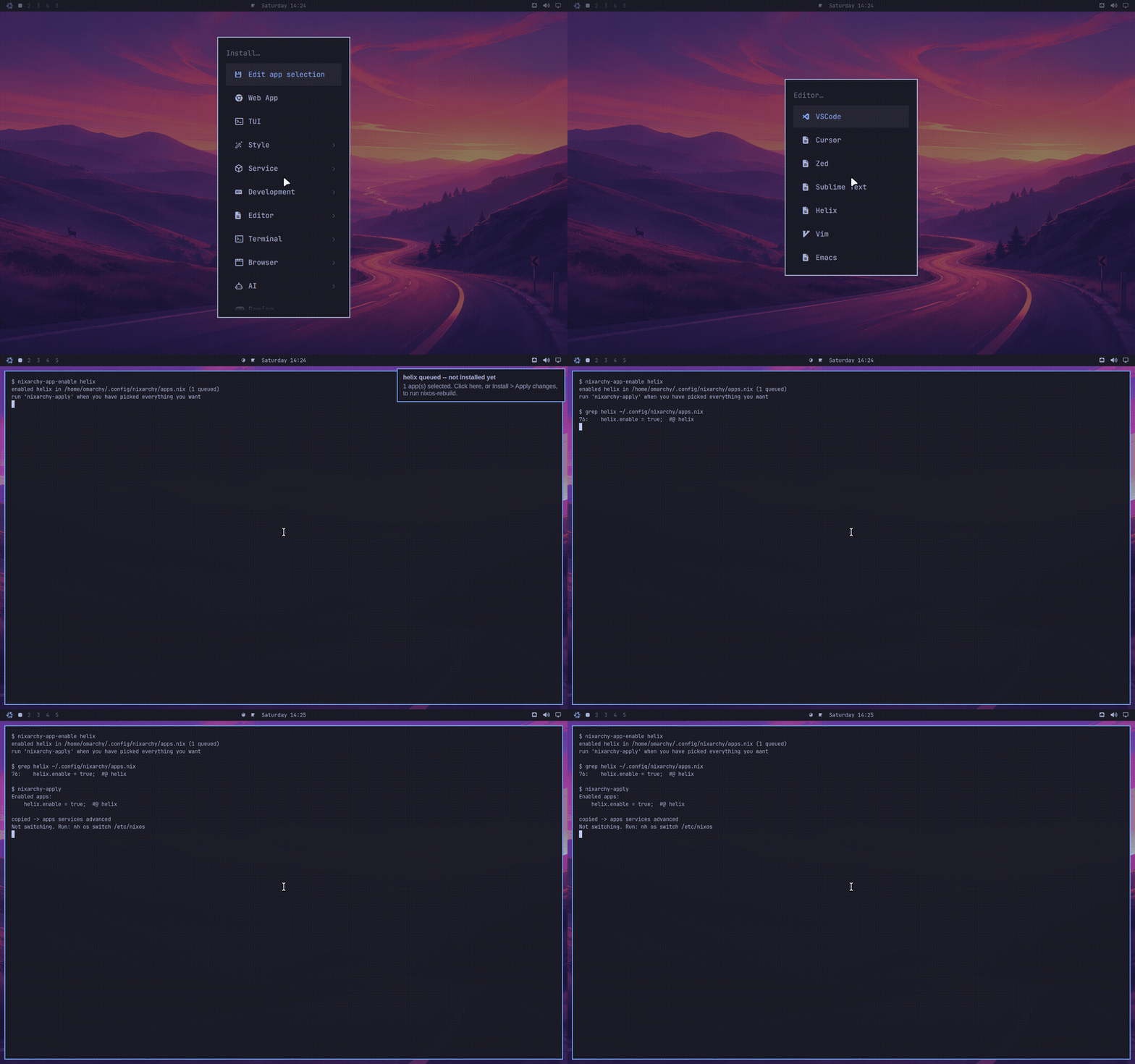
The Install menu still exists and still has every row Omarchy ships. Each row has been mapped to how NixOS installs the thing: 56 apps in total, of which 41 are plain nixpkgs packages, 5 are NixOS modules, 8 are built by nixarchy itself because nixpkgs does not carry them, and 2 have no equivalent and say so in the menu.
Picking a row does not install anything. It uncomments one line in
~/.config/nixarchy/apps.nix, which is a file nixarchy writes for you, fully
populated with every app and every line commented out. Pick five rows and you
have five uncommented lines. Then Install > Apply changes runs
nixarchy-apply, which copies that file to nixarchy-apps.nix in your flake
directory and offers to run nh os switch <flake>.
Finding it in the first place
nixarchy-search, or Install > Search, is one fzf picker over every nixpkgs
package, every NixOS option and the curated app list, with each entry’s type,
default and description in a preview pane. Picking a row routes it: an app is
enabled as an app, a package is appended as a package, and an option is written
as a line of its own. Booleans and enums get a value picker. Simple scalars –
a port, a string, a path – prompt for the value with the default in sight;
leave the prompt empty and nothing is written, because the default is already
in force and a copied-out default reads like a choice. Anything more
complicated is written commented out with its type and docs beside it, seeded
with the option’s own example (or its default) as a starting shape, for you to
edit rather than invent. The seeded scaffold stays commented: the picker knows
the shape, not your value.
The index comes from this machine’s own nixpkgs and its own options rather than from search.nixos.org, which costs about a minute once per system generation and means the picker can never offer something this machine cannot build.
The same thing from a terminal:
nixarchy-app-enable helix      # uncomment the line
nixarchy-app-disable helix     # comment it back out
nixarchy-apply                 # copy into the flake and rebuild
The ids are the ones in apps.nix; omarchy pkg install prints the file’s
location and nothing else, because it is the list.
One thing has to be true for any of this to work: your flake must import the file.
imports = [ ./nixarchy-apps.nix ];
Without that line every app looks enabled in the menu and nothing is ever
installed. nixarchy-apply checks for it and warns loudly, but it cannot add
it for you — the flake is yours, and nixarchy does not edit it.
Why some rows are modules, not packages
On Arch a package is a package. On NixOS a handful of the apps need more than files on disk, and for those the row enables a NixOS option instead:
| App | Option | Why a package would not do |
|---|---|---|
| Steam | programs.steam |
Needs an FHS wrapper to run at all |
| 1Password | programs._1password-gui |
Unlocking needs a setuid helper |
| Firefox | programs.firefox |
Policies and extensions become declarative |
| Xbox controllers | hardware.xpadneo |
A kernel driver |
Rows like these — and only these, the ones with an option to merge into —
accept settings. apps.nix is an ordinary NixOS module, so you can write
programs.nixarchy.apps._1password.settings.polkitPolicyOwners = [ "you" ];
beside the selection, and it is merged into programs._1password-gui.
Services are the other file
Tailscale is not on that list, and neither is anything else that is a decision
about the machine rather than a package. Those live in services.nix, beside
apps.nix in ~/.config/nixarchy/, with a catalogue of their own. It holds
two kinds of line, and the difference is what you need to know before tuning
one:
services.openssh.enable = true;                        # upstream's own option
programs.nixarchy.services.tailscale.enable = true;    # a nixarchy option
The first kind is there because nixarchy had nothing to add: you get the real NixOS option, the same line every wiki page and forum answer will show you. Configure it exactly as its own documentation says.
The second kind is there because turning the thing on usefully takes more than one option — Tailscale needs the firewall to trust the interface, or this host can reach your tailnet and nothing on your tailnet can reach it.
Bundled services have no settings passthrough and do not need one. Upstream’s
options are not re-declared and not taken away, so you write them directly, in
the same file:
programs.nixarchy.services.tailscale.enable = true;
services.tailscale.useRoutingFeatures = "client";   # upstream's option, untouched
That is the design rather than an omission. An option copied from upstream goes
stale and cannot be removed once people depend on it, so nixarchy declares only
what it genuinely integrates and leaves the rest of services.tailscale where
you already know how to look it up.
Unfree software
Chrome, VSCode, Cursor, Spotify, Steam and a few others are unfree in nixpkgs. nixarchy allows unfree packages by default, so all of them install without you doing anything — most of what the Install menu offers is unfree, and a licence error partway through a rebuild helps nobody.
To get nixpkgs’ own policy back instead:
programs.nixarchy.allowUnfree = false;
or nixpkgs.config.allowUnfreePredicate if you would rather list them.
Anything the menu does not offer
Upstream answers “something else” with Install > Package and a fuzzy list of
every Arch package. There is no such list here — omarchy pkg add <name>
prints the declarative route and exits 1 — because nixarchy owns the Omarchy
installation and its apps, not your system configuration.
Search search.nixos.org/packages (also Learn > Nixpkgs in the menu), then add it where the rest of your machine is declared:
environment.systemPackages = with pkgs; [ ripgrep-all ];
and rebuild. If you feed omarchy pkg add an Arch package name, it will often
translate it: fonts are answered with fonts.packages, PHP extensions with
php.withExtensions, the 32-bit graphics libraries with
hardware.graphics.enable32Bit, because each of those is a different shape on
NixOS and systemPackages would be the wrong answer.
Software in no repository at all
When nixpkgs, the curated list and Flathub all miss, the answer used to be
“write a derivation” — which needs the language this desktop was installed to
avoid. nixarchy pkg new gets you a first draft instead:
nixarchy pkg new https://github.com/someone/tool
runs nix-init headless: it picks
a builder, prefetches the hashes, infers dependencies for Rust, Go and Python,
and detects the licence. The result lands in
~/.config/nixarchy/packages/tool.nix, and is then built once before
anything is claimed. If the build has to learn a hash the draft could not know
in advance (Rust’s cargoHash, Go’s vendorHash), the failed build names it
and the draft is corrected automatically.
If it builds, a commented-out line is added to the packages block of
~/.config/nixarchy/apps.nix; review the draft, uncomment the line, and
nixarchy apply carries both into your flake. If it does not build, that is
said out loud and the draft is kept — a failed draft is still a better
starting point than a blank file.
Either way it is a draft: nix-init’s authors are explicit that it produces a starting point for a person to review, not a finished package, and this command never pretends otherwise. A draft pins one revision of one upstream; updating it when upstream releases is yours to do, by editing the version and hashes in the file.
Two ways to find this without knowing the command’s name. nixarchy pkg add
names it whenever nixpkgs has no such package – that miss is the moment you
have proved the package is not there, so it is the reliable signpost. The
Search picker also carries a static row for it (Missing from nixpkgs? Draft a
new package from a source URL), which asks for the URL and runs the same
command – but the picker is a single fuzzy search, so that row only appears
when your query happens to match its own words (try missing or draft).
Searching for the absent package’s name matches nothing and simply closes
the picker; nothing runs on an empty result, so the picker itself cannot point
you onward.
Removing
Remove > App / package runs nixarchy-app-remove, a picker over everything
the Install picker has written into apps.nix: enabled apps, packages added
with nixarchy pkg add, and options the Search picker set or scaffolded. It
only ever deselects; then nixarchy-apply rebuilds without them. Files go
away when the old generation is garbage-collected, and config under
~/.config stays, as on any system.
nixarchy pkg remove <attr> does the package half from a terminal, and with
no argument opens the same fuzzy picker over just the added packages.
Two things it deliberately will not do. It will not remove something you added
in your own systemPackages — the tools delete only lines carrying their own
#@pkg/#@opt markers, so a line you wrote (or a marker you stripped) is not
theirs to take away; delete it yourself. And it will not run
omarchy pkg drop, which still calls pacman and cannot work here.