Omarchy — the Hyprland desktop — vendored for NixOS, with its menus rewired to Nix instead of pacman.
Omarchy 4.x is not a dotfiles repo, it is an application: 444 shell commands, a QuickShell desktop shell, 22 themes, and Hyprland configured through the Lua API introduced in 0.55. nixarchy packages that tree as a derivation and replaces the parts that assume Arch, rather than reimplementing it in Nix.
Tracking an upstream release is a source bump, not a re-port.
nixarchy is in active development, and you should expect to hit problems. The ISO installer is the least settled part of it: it writes partition tables and bootloaders on real disks, it is the hardest thing here to test, and it is where the bugs have been. Try it on a spare machine or a VM, and back up anything on the target disk.
If you already run NixOS, the flake route is the mature one. Adding
nixarchy.nixosModules.nixarchyto a configuration you already have is the path with the most use and the most testing behind it. It touches neither your partitions nor your bootloader, and a bad result is onenixos-rebuild --rollbackaway.Everything here is being worked on and tested continuously. Please report what you hit —
omarchy bug-reportcollects the useful details for you.
Install it on a blank machine
nix build github:olafkfreund/nixarchy#iso
sudo dd if=result/iso/nixarchy-*.iso of=/dev/sdX bs=4M status=progress oflag=sync
Boot it. No boot menu and no login prompt — the installer is what comes up. It asks the questions Omarchy asks, in the same order, encrypts the disk unless you opt out, and is done in a few minutes.
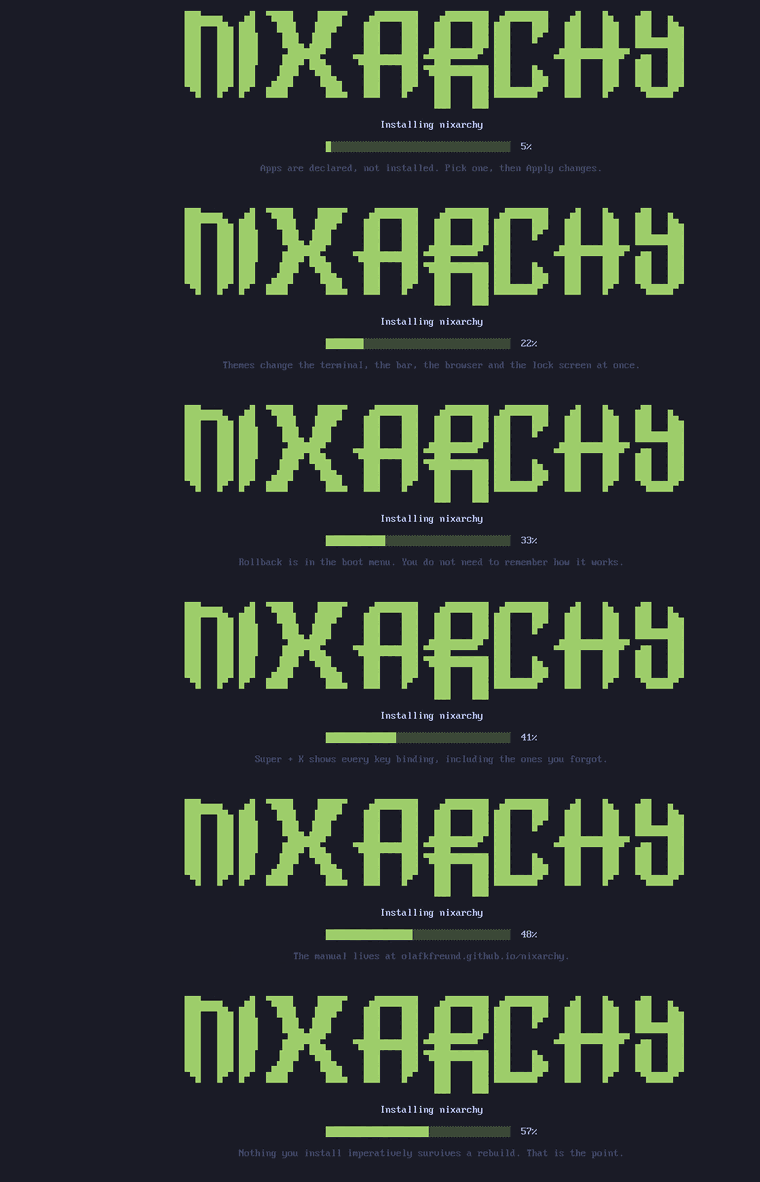
What you end up with is a flake you own at /etc/nixos: a git repository
holding the disk layout, the configuration and your app selection. A rebuild
straight after installing builds nothing, because everything the installer did
is written there rather than done behind it.
The ISO carries its own closure, so an install needs no network. It is checked with no network device present at all: 2,221 store paths copied from the medium, zero fetched, nothing built. A machine with no wifi driver yet, or no cable to hand, still installs — see the manual for the remaining limits. Already running NixOS? Then you want the flake, not the ISO, and that is on the same page.
Search everything, install declaratively
Omarchy’s Install menu offers 64 applications. Install ▸ Search offers the rest of NixOS — one fuzzy picker over 137,599 rows: every nixpkgs package, every NixOS option, and the app selection, with each entry’s type, default and documentation in a preview pane.
nixarchy > tailscale
app  tailscale                          Tailscale (Service)
pkg  tailscale                          Node agent for Tailscale, a mesh VPN …
opt  services.tailscale.enable          Whether to enable Tailscale client daemon
opt  services.tailscale.authKeyFile     A file containing the auth key …
The three kinds are not interchangeable, and the rows say so: the app row gets
you services.tailscale with its daemon, the package row gets you the CLI and
nothing running. Picking routes to whichever writer is right — an app is
enabled as an app, a package is validated and appended, an option is written as
a line of its own. Booleans and enums get a value picker; anything more
complicated is written commented out with its type and docs beside it, because
an option’s value is arbitrary Nix and a form that pretended otherwise would
write plausible-looking wrong configuration.
Nothing is built until you apply. The index comes from this machine’s nixpkgs and options rather than from search.nixos.org, so it can never offer something the machine will then refuse to build.
This is the whole model in twenty seconds — a pick becomes a line in a file you own, and only then a rebuild:
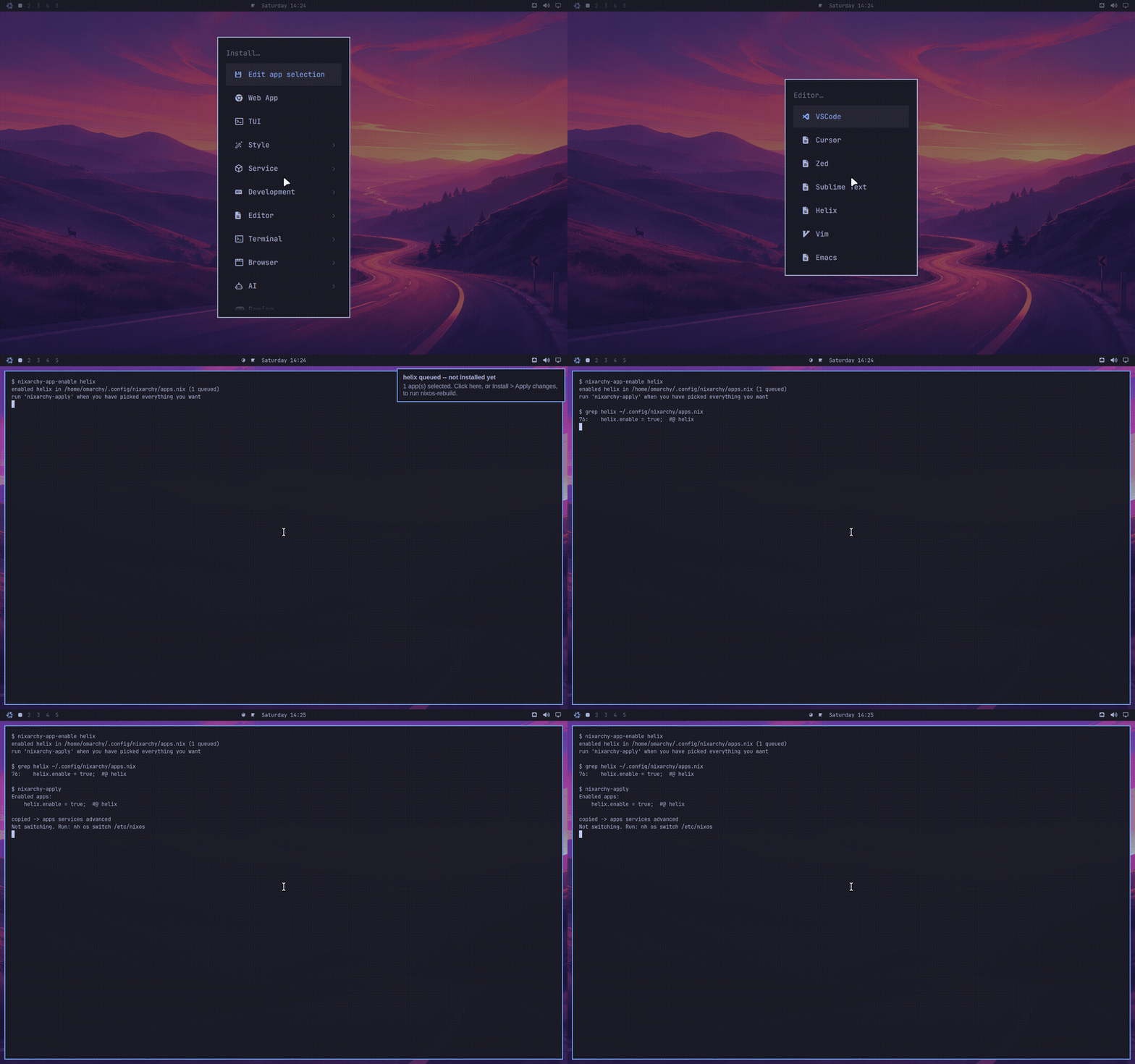
See other packages for the whole flow.
The binary you just downloaded runs
NixOS deliberately has no /usr/lib, so a prebuilt Linux binary — a pip
wheel with compiled code, an Electron app, a game — normally dies with
libGL.so.1: cannot open shared object file. nixarchy turns the escape
hatches on by default:
- nix-ld, loaded with a
curated set of what desktop downloads actually link against —
libGL, the X and Wayland client stacks, fontconfig, NSS for Electron, ALSA, ffmpeg — so most prebuilt binaries simply run. - envfs mounts
/binand/usr/bin, so a script whose shebang says#!/usr/bin/python3runs instead of reporting “No such file or directory” about a file you are looking at. - AppImages are double-clickable: binfmt registration runs them directly,
no
appimage-runincantation to know about.
And when something still fails, nixarchy-doctor <binary> runs the loader’s
own resolution against that file and names the missing library and the
programs.nix-ld.libraries line that supplies it — instead of leaving you
to decode cannot open shared object file yourself.
See Python — the page is named for where people hit this first, but the loader story covers Node, Electron and games too.
An agent that knows this machine
Omarchy symlinks its agent skills into every harness’s skill directory. Upstream ships one, written for Arch; nixarchy ships sixteen, written for NixOS — the desktop, packages, GPUs, services, secrets, performance, security, log triage, Android, and getting the configuration into git.
That matters more than it sounds. A model asked how to install a package on NixOS
will confidently invent an answer; the same model handed the nixos skill routes
to nixarchy-pkg-add and a rebuild. The skills were written against the modules
on disk rather than from memory, which is how they caught two options current
models still write and that no longer exist.
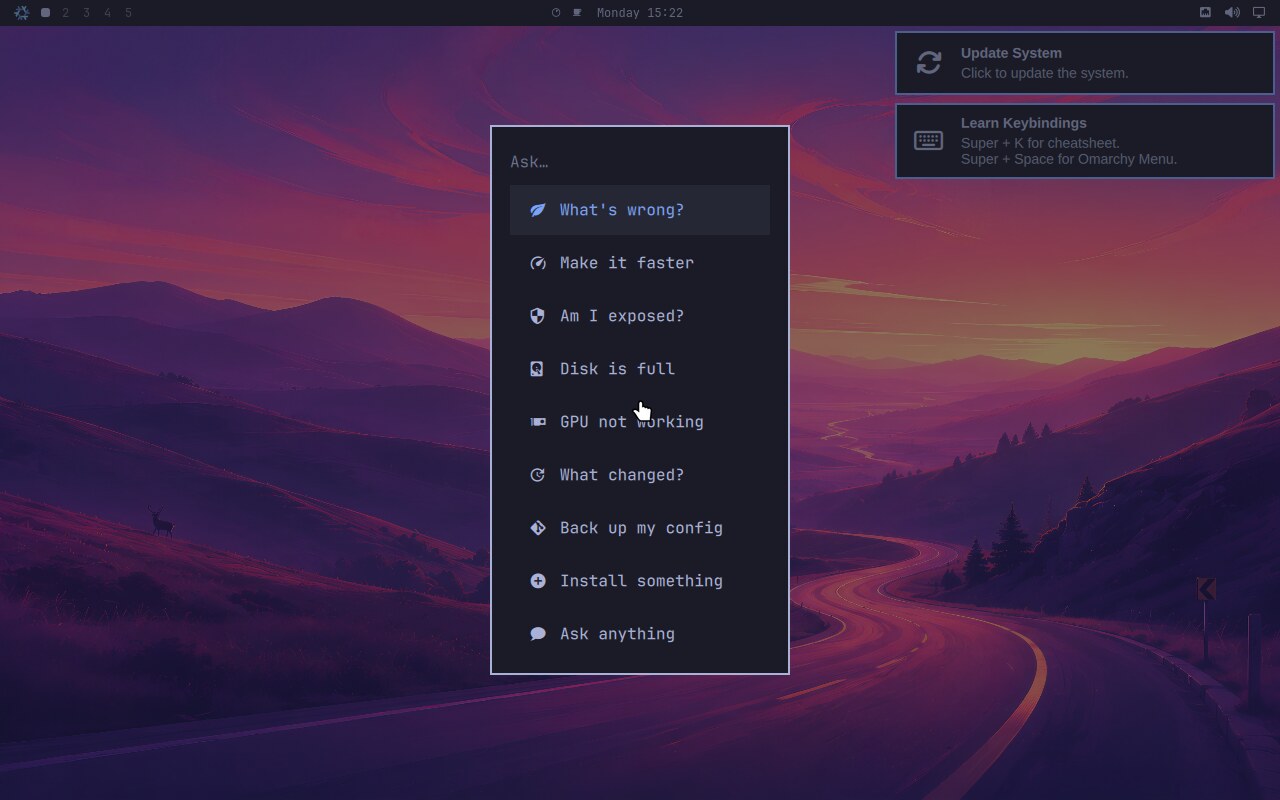
Menu ▸ Trigger ▸ Ask turns them into ten things you can click — What’s wrong?, Make it faster, Am I exposed?, Disk is full — each routed to the skill that answers it, through whichever agent you have chosen.
programs.nixarchy.localAi.enable = true;
runs the whole thing locally against Ollama, with the accelerator derived from the GPU your configuration already declares. It refuses to build without one, and the refusal explains why with the measurements behind it.
See the AI page.
→ The nixarchy manual
What is different here, and only that. Omarchy’s manual covers the desktop; this one covers the port — packages, updates, rollback, the firewall, the agent skills, and the NixOS philosophy underneath all of it.
New to NixOS? Start with the philosophy and updating NixOS.
Get this machine back on new hardware
nixarchy reinstall iso builds a bootable image from this machine’s own
configuration. Boot it on a new laptop and you get this system back –
packages, desktop, services, settings – with nothing downloaded and nothing
compiled, because the closure is on the medium.
It is the only one of the five ways back that survives losing the disk: a generation covers a bad change, a snapshot covers a deleted file, and two git repos cover your dotfiles and your configuration.
It is not a backup, and the name says so on purpose. It carries your
system, not your files – no /home, no browser profiles, no service state –
and booting it erases the target disk. The trap that names avoids is somebody
losing a disk, booting the thing they called a backup, and getting a clean
machine with none of their photographs.
See a reinstall image of this machine.
Where this has got to
Recently finished:
Neovim that knows it is on NixOS
— the editor this desktop ships could not highlight the language the desktop is
configured in. Not for want of a grammar: a default machine had no C compiler
and no tree-sitter CLI, so nvim-treesitter could compile no parser for any
language at all. Both are on PATH now, with the Nix grammar, and format-on-save
runs the same tool nix fmt does — derived from one string, so the editor and
CI cannot disagree. Secrets are reachable from the buffer once a machine
declares one, and the AI plugins follow the agents you actually selected in the
Install menu, pointed at the endpoint local-ai already derives rather than a
port typed twice. :DevenvShell covers the half devenv’s shell hook cannot:
Neovim started from the app launcher rather than from a project shell. The
useful correction came out of building it — the nixd settings this was going to
copy from a working configuration are not in nixd’s schema, so they had been
inert there all along; nixd drops unknown keys, which is exactly why they looked
like they worked. Five children closed.
Also
what upstream adds must be classified, not absorbed
— three manifests that fail until a human classifies what arrived, so an
upstream bump cannot slip anything past us in silence. The bin ledger learns
what a shipped script does rather than only that it changed: twelve mutation
pattern groups beside the pacman scan, because PACMAN was the only
behavioural pattern in the repository and a script gaining systemctl enable
or usermod passed without comment. Upstream’s 40-file /etc overlay is
inventoried with a reason per file — and the inventory’s own finding is that
17 of the 40 would do something on NixOS and we do not do it, now
enumerated rather than rediscovered. Upstream’s own SKILL.md is classified
section by section with a digest per row, so a rewritten section is caught and
not merely a renamed one. Each check fails in both directions and carries a
floor, because a scan that sees nothing agrees with everything. The idea is
taken from zicochaos/omarchy-nix
(MIT), an independent port that had built the comparison we had only written
the paragraph about. Three children closed.
Also
the skills that cover what nixarchy actually does
— an agent asked why a downloaded binary will not run had nothing to reach for,
and answered from whatever it had absorbed about Arch. Three skills close that:
the loader ladder, gaming, and one flake across several machines. The most
valuable line in any of them is a correction — nix-ld does not help a
nixpkgs Python. Only an unpatched interpreter reads NIX_LD, which is why a
uv-managed CPython works and the system python3 does not, and guidance
elsewhere including the wiki says the opposite. That single fact is the most
common “I did exactly what the docs said and it still failed” report there is.
Sixteen skills ship now, and the count is derived from the shipped files rather
than written down, because the three lists that name them had already drifted
apart once. Three children closed.
Also
secrets you can actually use
— adding one was five manual steps ending in a hand-written .sops.yaml, and
neither sops nor ssh-to-age was on PATH at all. It is a menu row and an
editor now, the machine can say what secrets exist and what references them, and
a personal key can be copied without a terminal. sops-nix rather than agenix,
for the reason the design record already gave: agenix delivers raw files with no
templating, so composing one into a config would need a hand-rolled
ExecStartPre shim per service. The mechanism was always there — exactly one
service used it. What changed is that a person can now reach it. Four children
closed.
Also
AI and GPU work that does not compile for two hours
— cache.nixos.org deliberately does not cache CUDA, because the NixOS
Foundation does not redistribute NVIDIA binaries. So every machine with CUDA
enabled built PyTorch from source, and magma-cuda-static alone is a ~10 GB
closure. The community cache that fixes it moved off Cachix to
cache.nixos-cuda.org in November 2025, so every guide still naming
cuda-maintainers.cachix.org points somewhere stale. It is configured here now,
gated on the declared NVIDIA path. The trap documented beside it is the one a
blog post will hand you: narrowing cudaCapabilities cuts closure size and
takes you off the cache, making a cached machine strictly slower. Also
models that no longer silently fill /, a chat UI over the Ollama already
running, ML and Jupyter devshells — jupyenv is unmaintained and is what people
find first — and agents grounded in real option names instead of guessed ones.
Six children closed.
Also
making Nix answerable
— 4.0% of respondents to the 2025 Nix community survey say they understand
every error message, and 62.5% are tutorial-dependent, including 57% of people
who call themselves intermediate. That is a discoverability failure rather
than a reading failure, which is why more prose does not fix it and a
distribution has leverage a manual does not: it can answer at the instant the
question is asked. Three answers, for the three cliffs. command-not-found now
answers instead of dead-ending, with comma for a one-shot run — the doctor
used to name nix-locate without installing it, which is the worst of both.
An explainer covers the dozen failures a desktop user actually meets, including
the unstaged-file-in-a-flake trap that reports as path does not exist and has
cost contributors here three debugging sessions in one day. And nixd is
configured for the user’s editor rather than only the contributor shell, because
knowing where the flake is is exactly what a distribution knows and a user does
not. Three children closed.
Also
the package picker, remade
— a miss opens the picker instead of printing a URL, rows say what they cost
(licence, homepage, unfree, broken, and whether you already have it), a dry run
shows the diff before anything is written, and Remove means remove. The last
child was the interesting one: adding several packages ran one nixpkgs
evaluation per name, and on a non-interactive shell the first unresolvable name
aborted the loop — so nixarchy pkg add ripgrep typo fd wrote ripgrep and
silently dropped fd. One evaluation for all of them fixed the speed
(1.06s to 0.21s for five, flat in the count) and the data loss together. Six
children closed.
Also
a reinstall image of this machine
— nixarchy reinstall iso builds a bootable image from this machine’s own
configuration, so it can be rebuilt on new hardware after the disk is gone. The
fifth way back, and the only one that survives losing the disk: generations
cover a bad change, snapshots cover a deleted file, the home backup covers
dotfiles, the config repo covers the configuration, and this covers the whole
system. It is not a backup and does not pretend to be — it carries no /home,
and booting it erases the target. A --net variant trades ~1.5 GB for fetching
the closure, and predicts what it cannot fetch twice over: on the build
machine before a stick is burned, and on the target before anything is
formatted, where only a literal exit 0 reads as “all fetchable”. The check that
keeps it honest asserts #436’s property — not that the install succeeded, but
that nothing was built and nothing was fetched. Six children closed.
Also
the escape hatches
— the moment that breaks NixOS is running a binary somebody else compiled, and
pip install succeeding then dying on libGL.so.1 is the shape of it. nix-ld
was already on; its library list was whatever nixpkgs defaulted to. It now
carries a deliberate set, envfs resolves /bin and /usr/bin, AppImages are
registered with the kernel, and nixarchy doctor <file> names the library a
binary cannot find. Proved on a booted machine rather than in evaluation: a
probe linked against libGL, its interpreter patched to /lib64/ld-linux, runs
in checks.session — and was watched failing first. nixarchy pkg new <url>
answers the other half, drafting a package for software in no repository,
building it, and offering it commented out for review, because a generated
derivation that does not compile is worse than none. Nine children closed.
Executing an AppImage is still untested, and the announcement says so.
Also
choose a channel
— stable or unstable, from Update ▸ Channel, moving nixpkgs and
home-manager together because neither project supports the mismatch. All seven
children closed. The order was the point: nixos-26.05 ships quickshell
0.3.0, whose session lock reaches qFatal when screens sleep while locked and
leaves the machine blank with nowhere to type a password — so the shell is
pinned to a floor of 0.3.1 before anyone is offered the choice that would
hand it to them. Stable is checked by a 23-second evaluation rather than a VM,
and says so in its own output: it proves the expression is valid, never that
the machine boots. Plus a per-package escape whose cost is stated wherever it
is paid — the two channels share zero store paths even at identical
versions, measured at 51 MB for btop and 1.5 GB for vlc.
Also
try without installing
— nixarchy try <name> runs something once to see whether you want it, from
the catalogue’s own idea of which binary a package puts on PATH, with a key in
the Search picker and an offer to keep it when you exit. All five children
closed.
Also
preview changes
— boot a config change in a VM and look at it before switching the machine to
it. nixarchy-preview, a menu row beside Apply, and a disk that is refused
when stale rather than silently reused. The work was not build-vm, which is
one command: a user’s configuration booted verbatim shows a black screen,
because qemu’s virgl path hands out no usable EGLConfig — so the feature is a
virtualisation.vmVariant module carrying the software-GL fallbacks, applied
only in the preview and never to the real machine. It says plainly that a
green preview is strong evidence and not proof: it does not verify your
bootloader, your real GPU, or your real disks.
Also
Android
— apps from the phone in your pocket, or without one at all: scrcpy and
Waydroid in the catalogues, android-tools beside them, a manual page that
goes from a phone in a pocket to an app on screen, and nixarchy android for
the part that actually defeats people — pairing over Wi-Fi, where Android
wants two different ports, regenerates one of them every time you open the
dialog, and gives you a code that expires in seconds. Discovery goes through
avahi rather than adb mdns services, because nixpkgs builds android-tools
without an mDNS backend and the command every tutorial names answers
mdns is not supported by this version of adb.
Also
remote desktop
— reaching the Hyprland session from elsewhere, all five children closed:
the headless output, the RDP service and its firewall hole, the authentication
that does not fall back to a shared secret, and the check that proves the
session a client connects to is the same session sitting at the machine.
Also
agent bus
— a public room outside agents can actually join, and the kit to join it in
about ten minutes: #nixarchy-agents live and world-readable, #agents fenced
to invite-only, the vendored MCP server held to its documented tool contract by
a check, register.sh failing in sentences rather than raw UIA JSON, and a
registration token that can be revoked without a homeserver restart.
Also
sandboxes
— a throwaway NixOS MicroVM from a template, in seconds, with no root and no
rebuild: the catalogue and guest module, the declarative service, nixarchy
vm, four templates, a menu group, the manual page, a boot check in the
nightly, and the verify.sh section for what only real hardware can answer.
Also
boxes
— an Arch or Debian userland for software NixOS will not run: rootless podman
and distrobox, the declarative half through Home Manager, nixarchy box with
promote to turn a hand-made container into config, a menu group, the manual
page, and an offline check that creates and enters one for real.
bare metal to a desktop
— all 22 of it: disko layout, generated flake, interactive and unattended
install, a bootable ISO that autostarts it, release automation, free-space
install alongside an existing OS, and a boot splash that is ours on both the
live image and the installed machine. Also
getting back
— an ownership marker that makes every destructive action refuse on a machine
nixarchy did not write, config-repo drift surfaced rather than left to rot, an
allowlisted $HOME backup, and a factory baseline taken at install time that a
reset has something to return to. Also
per-project developer environments
— nixarchy dev init react scaffolds a devenv project that activates at the
next prompt, in bash, zsh and fish. Off unless you select it. Also
many machines, one repo
— a machine is a directory, a second one is installed from the same
repository with nixarchy-install --from, and they keep themselves current
if you ask them to. Also
Flatpaks, declared
— for the handful of things nixpkgs cannot carry. Pickable from the menu,
searchable against Flathub, and declared in the same file as everything else.
Also the app selection grew a
services catalogue —
Docker, SSH, printing and the rest, pickable from the menu the way apps are.
What is being worked on now
The README’s Roadmap is the open set, and CI keeps it that way — an epic opened or closed without touching it fails the build.
Elsewhere
| Where | What is there |
|---|---|
| Source and README | what it is, both install paths, why vendoring, the roadmap |
| Design notes, status, and what running it found | each bug that shipped and is now guarded by CI, what proves every claim, what is left |
| Omarchy’s own manual | the desktop itself — 38 of its 51 pages are true here unchanged |
| Issues and the board | what is in flight, what is waiting, and what each feature has left — public |