Boxes
A box is an [Arch or Debian] userland you can drop into with one command –
.deb packages with a postinstall script, an AUR package, a vendor installer
that wants to write to /opt, an old toolchain that needs a distro from three
years ago. distrobox is an OCI container that mounts
your $HOME and integrates tightly with the host, so its GUI apps land in
your launcher too. It is off by default, and this page is when to reach for
it instead of the other three answers this desktop already gives to “this is
not packaged.”
What it is not
Not a sandbox. Upstream says this outright, and so does this feature: a
box runs --privileged, with host PID/IPC/network namespaces, your entire
$HOME read-write, all of /dev, and the host root readable at
/run/host. It sits in the menu next to Flatpak, which is a sandbox –
do not expect the same isolation. A box is a compatibility layer, not a
boundary.
Not the answer when nixpkgs already has the package. nixpkgs first, always – a box costs a second package manager, a second update cadence, and a container you have to remember exists.
Not the answer for a loose prebuilt binary. That is nix-ld, already on
for every nixarchy machine: a prebuilt binary that just needs a loader does
not need an entire other distro under it.
Not the answer for a project toolchain. That is
devenv – pinned, per-project, and gone when you
leave the directory. A box is a whole userland; devenv is a version of node.
When to reach for which
| you have | reach for |
|---|---|
| anything in nixpkgs | nixpkgs – always first |
| a package you are not sure you want yet | nixarchy try – runs it once, installs nothing, isolates nothing |
| a GUI app that is not, and you want it contained | Flatpak |
| a loose prebuilt binary | nix-ld, already on – Prebuilt binaries covers its library set |
| a downloaded AppImage | just run it – binfmt registration is on (Prebuilt binaries) |
a pip wheel that installs but dies on libGL.so.1 at import |
the same loader problem – Python |
| pip compiling C against system libraries | a devenv with the libraries added, or an FHS shell (pkgs.buildFHSEnv) |
| a toolchain this project needs | devenv |
| software that wants a distro | a box |
Turning it on
Boxes are a row in the services catalogue, off until you pick it:
nixarchy-service-enable boxes
nixarchy apply
or, in your own configuration:
programs.nixarchy.services.boxes.enable = true;
This turns on rootless podman (virtualisation.docker,
if you already use it, is untouched – boxes only need podman) and installs
distrobox itself. Rootless means --userns keep-id: files a box writes in
$HOME stay yours, there is no daemon, and no root-equivalent group – the
same property nixarchy’s own rootless Docker default has, for the same
reason.
Making one
nixarchy box templates       # what's available
nixarchy box create dev --template archlinux
nixarchy box enter dev
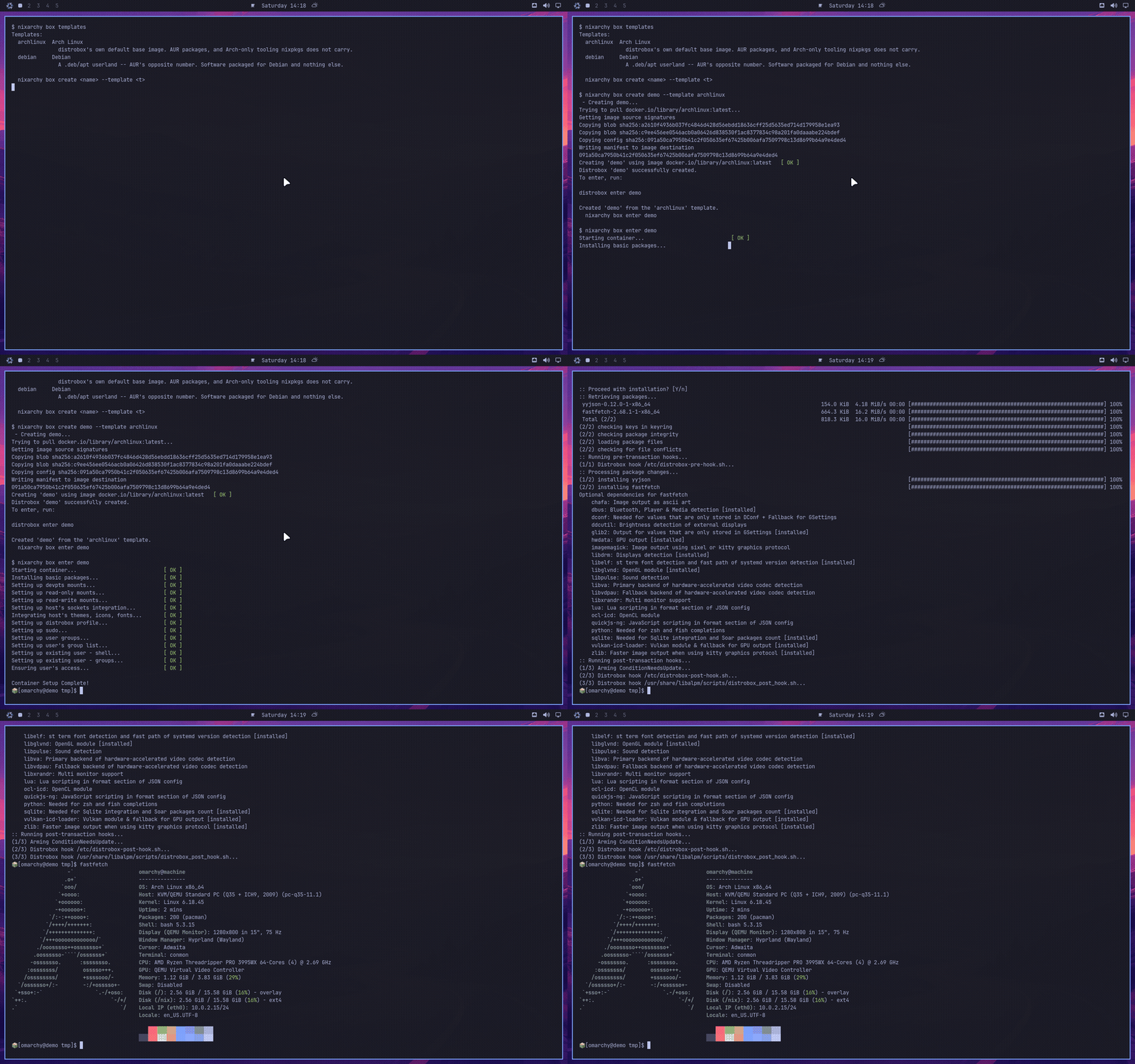
nixarchy box is also reachable from the menu – Trigger ▸ Boxes, or
search for “box” or “distrobox” – as one row per template, plus “Enter a
box” and “Remove a box”, which prompt for which one.
Templates are distrobox’s own distrobox-assemble INI, verbatim: image,
and whatever else the template needs – additional_packages, init_hooks,
exported_apps. Nothing in that text is nixarchy vocabulary. When you
outgrow a template, you grow it from
distrobox-assemble’s own manual,
not from anything this page invents – so ecosystem drift, a renamed field or
a new base image, stays upstream’s problem instead of this repo’s.
| template | for |
|---|---|
archlinux |
distrobox’s own default. AUR packages, Arch-only tooling |
debian |
.deb/apt software – AUR’s opposite number |
Declared, or thrown away
Both halves exist on purpose, and the distinction is the whole feature:
- Ad hoc.
nixarchy box createmakes a box right now, imperatively – the one deliberate corner of a nixarchy machine where that is the right answer. It lives entirely in podman’s own state; nothing here manages it. - Declared.
programs.nixarchy.services.boxes.machines.<name>in your own flake makes a box that comes back the same way after every rebuild, through Home Manager’s ownprograms.distrobox.containers.
What is declared is which boxes exist – never what you did inside one. A box you decide to keep gets promoted:
nixarchy box promote dev
which prints a starting snippet – the image podman recorded, and a reminder
of what else distrobox-assemble accepts – for you to paste into your own
configuration and fill in. From there it rolls back with a generation like
everything else declared; a box made with nixarchy box create does not,
because it was never part of one.
GUI apps in your launcher
A template’s exported_apps and exported_bins fields (see
distrobox-assemble’s manual) write .desktop files under
~/.local/share/applications and shims under ~/.local/bin – the app shows
up in the launcher and runs through the box without you opening a terminal
first.
The wrapper-only rule, and why it matters to you
distrobox resolves its own support scripts relative to the directory its own
binary was called from. Called through a versioned /nix/store/... path –
which is exactly what happens if something invokes it any way other than by
its bare name on PATH – that resolution bakes a generation-specific path
into every container it creates, and nix-collect-garbage can delete that
path out from under a box that is still running
(nixpkgs#478154, open, no
fix upstream). nixarchy box only ever calls distrobox by its bare name,
which resolves through /run/current-system/sw/bin and tracks whichever
generation is current – so a box you made stays working across upgrades and
garbage collection. This is why the answer to “my box stopped starting after
an update” is never “reinstall it”: it means something reached distrobox the
wrong way, which nothing in this repo’s own commands do.
Getting out
nixarchy box rm dev
Removes the container and its exported apps and binaries. The base image
distrobox pulled stays in podman’s own store until you remove it yourself
(podman rmi <image>) or run garbage collection on podman’s storage –
nixarchy box rm only ever touches the one container you named.