AI
Omarchy’s agent tooling — the lazy-loaded launchers, the default agent, the
agents panel in the top bar, crash diagnosis, the local-LLM recommendations —
is upstream’s tree running unchanged. omarchy default agent <name>,
Super + Shift + Ctrl + A, omarchy agent prompt "...",
omarchy agent crash <pid>, omarchy toggle crash-capture and the
omarchy-agent-* commands all work as
the upstream page describes them, and that
page is the reference for how to use them.
Two things differ, and the second matters more than it looks.
The desktop apps are declared, not installed
The Install > AI rows (ChatGPT, Grok Bot, LM Studio, Ollama) do what every
Install row does here: they queue the app in ~/.config/nixarchy/apps.nix, and
nixarchy-apply rebuilds. See
the philosophy page.
The HEY CLI is packaged as hey-cli and installs its binary as hey. It has
no Install row yet because the Omarchy release nixarchy vendors ships none, so
enable it from your flake:
programs.nixarchy.apps.hey-cli.enable = true;
The skills are rewritten, because upstream’s would lie
Omarchy ships one agent skill, omarchy, and symlinks it into the skill
directories of Claude Code, Codex, Pi and the generic ~/.agents/skills
location, so most harnesses load it automatically. nixarchy keeps the
mechanism — omarchy-provision-user symlinks every directory under
$OMARCHY_PATH/default/agents/skills/ into ~/.claude/skills,
~/.agents/skills, ~/.codex/skills and ~/.pi/agent/skills — but ships
sixteen skills instead of one:
| skill | owns |
|---|---|
nixarchy |
the desktop: ~/.config/hypr/, ~/.config/omarchy/, terminal configs, themes, keybindings, the bar, idle and lock, the omarchy commands |
nixos |
packages and everything outside ~/.config/: services, users, hardware, boot, networking, fonts, Home Manager, the flake, rebuilds and rollback |
nixos-gpu |
NVIDIA/CUDA, AMD/ROCm, Intel, and the three layers a working GPU actually needs |
nixos-ai |
Ollama, Open WebUI, llama.cpp, model sizing, pointing an agent at a local endpoint |
nixos-services |
systemd units, firewall and ports, containers, and reading a failed rebuild |
nixos-secrets |
agenix, sops-nix, *File options, and why a leaked secret is rotated rather than deleted |
nixos-performance |
kernel, zram, governors, storage, Nix build speed, boot time |
nixos-security |
firewall and nftables, SSH, sudo, systemd sandboxing, kernel hardening |
nixos-doctor |
the whole-machine sweep to run before forming a theory |
nixos-config-repo |
getting the configuration into git, and keeping it there |
nixos-android |
mirroring a phone with scrcpy over USB or Wi-Fi, and Waydroid in a container |
nixos-binaries |
why a downloaded binary or a pip wheel will not run, and the ladder out: nix-ld, envfs, AppImages, an FHS environment, a box |
nixos-gaming |
Steam and Proton, the 32-bit graphics stack, controllers, gamescope, RetroArch and the launchers |
nixos-fleet |
one flake and several machines: the hosts/<name>/ layout, sharing without coupling, pulling on a timer, deploying with --target-host |
devenv |
per-project environments: devenv.nix, the lockfile, and whether a tool belongs to the project or the machine |
diagnose-crash |
working out why a process dumped core, and where to report it if it is a distribution bug |
Each is written against the modules on the disk rather than from memory. That is
not fastidiousness: it caught services.ollama.acceleration, which was removed,
and services.ollama.models, which was renamed to modelsDir. Both are still
written confidently by current models, and both fail evaluation.
The split follows the boundary the rest of this manual keeps drawing: what is
under ~/.config/ is yours and takes effect on save; what is declared in the
flake only changes at a rebuild. An agent that does not know which side of that
line a request falls on will do the wrong kind of change, and the wrong kind is
the one that silently does not last.
The agents are given a server that knows NixOS
Skills tell an agent how this machine is shaped. They cannot tell it whether
services.foo.enable exists — that is a fact about nixpkgs on the day you ask,
and it is the fact models are worst at. Nix is lazy and untyped, the public
corpus of it is small, and option names are not guessable, so a confident
sentence naming an option that does not exist is the normal failure rather than
an unusual one.
So nixarchy declares mcp-nixos in the
agents that can take one. It is an MCP server that answers package and option
questions against the real sets — nixpkgs, NixOS options, Home Manager and
nix-darwin — so the answer comes from the index rather than from memory.
Three agents get it, each in the file that agent actually reads:
| agent | file | key |
|---|---|---|
| Claude Code | ~/.claude.json |
mcpServers |
| Codex | ~/.codex/config.toml |
[mcp_servers.nixos] |
| opencode | ~/.config/opencode/opencode.json |
mcp |
Two of the four skill directories above get nothing, and that is deliberate
rather than an omission: ~/.agents/skills is a generic convention with no
single tool behind it, and Pi documents no MCP configuration file. Writing one
anyway would put a file on your disk that nothing reads.
Nothing is clobbered. Each file is merged into key by key — a server you declared yourself survives, and so does everything else in the file. Turn the whole thing off with:
programs.nixarchy.mcp = false;
Why omarchy could not ship as-is
Upstream’s skill is written for Arch. It points the agent at
/usr/share/omarchy, which does not exist here, and its decision framework
answers “install a package” with omarchy pkg add. On nixarchy that command
prints the declarative route and exits 1; it installs nothing. An agent
following the upstream skill would run it, see a non-zero exit, and either
retry with pacman — absent — or fall back to nix-env -i or nix profile
install, which “work” and then vanish at the next rebuild. That is the one
failure mode that looks like success, so the skill is renamed nixarchy and its
front page rewritten rather than patched.
Rewriting it wholesale leaves a second problem, which data/skill-parity.nix
answers: upstream’s own SKILL.md can gain a section, lose one, or have one
rewritten at any bump, and a replacement performed without reading it would
never notice. The manifest carries one row per upstream heading and per command
group — preserved, adapted or omitted, with a reason where the content is
gone and an anchor string that has to be findable in this port’s skill where
it is not — and checks.skill-parity fails in both directions plus on a pinned
digest, so the decision is forced at bump time rather than found by a user. The
idea and the anchor-proof shape come from zicochaos/omarchy-nix (MIT).
nixos is new and owns the install question outright. Its first rule is that
a request that would normally end in an install command ends in a file edit and
a rebuild instead, and it ranks the routes: nixarchy-app-enable <id> then
nixarchy-apply for an app the Install menu knows; a flake edit and
nixos-rebuild switch for anything else; nix shell nixpkgs#<pkg> for a
throwaway try that is not meant to be a change to the machine.
diagnose-crash keeps its name because omarchy-agent-crash reads that path
literally. Its body is upstream’s with three corrections: there is no public
debuginfod serving nixpkgs builds, so symbols only resolve if the machine runs
nixseparatedebuginfod; “what changed recently” is answered by
nix profile diff-closures --profile /nix/var/nix/profiles/system rather than
package mtimes, and sudo nixos-rebuild --rollback switch tests the theory; and
a confirmed bug has two possible homes, nixarchy for anything NixOS-specific and
Omarchy for anything that would happen identically on Arch.
The one thing an agent must be told
A rebuild does not update the session the agent is running in.
OMARCHY_PATH and PATH are set at login and point at whichever store path was
current then. nixos-rebuild switch installs a new package at a new store
path and cannot reach into a session that already exists. Every omarchy-*
command the desktop runs — every keybinding, every menu row — comes from the old
build until you log out and back in. Home Manager deploying ~/.config/hypr is
a symlink swap into the store, which Hyprland’s auto-reload does not notice, so
that needs hyprctl reload too.
Humans lose an evening to this. An agent loses it faster, because its natural
verification — run the script at its full installed path and see that it works
— passes, while the keybinding still runs the old one. The nixarchy skill
spells out the check:
echo "$OMARCHY_PATH"
readlink -f /run/current-system/sw/bin/omarchy | sed 's|/bin/omarchy$||'
If those differ, the fix is applied and the session is stale. nixarchy-doctor
reports the same thing under Session. Without this in the skill, an agent
that has just made a correct change will conclude it did not work and start
undoing it.
Treat the skills as upstream does
Upstream’s advice stands: run in plan mode first, and different models use a
skill to different effect. The rollback advice changes, though. Upstream says be
ready to run omarchy reinstall configs if the agent makes a mess; here
omarchy reinstall cannot finish, because it runs pacman -Suu first and the
shim refuses. For desktop config, omarchy refresh <app> restores a stock
file. For anything the agent changed in the flake,
sudo nixos-rebuild --rollback switch puts back the previous generation.
Asking the machine to do something with them
A skill only helps if something loads it. Menu ▸ Trigger ▸ Ask is ten rows that do — What’s wrong?, Make it faster, Am I exposed?, Disk is full, GPU not working, What changed?, Back up my config, Install something, Ask anything — each routed to the skill that answers it.
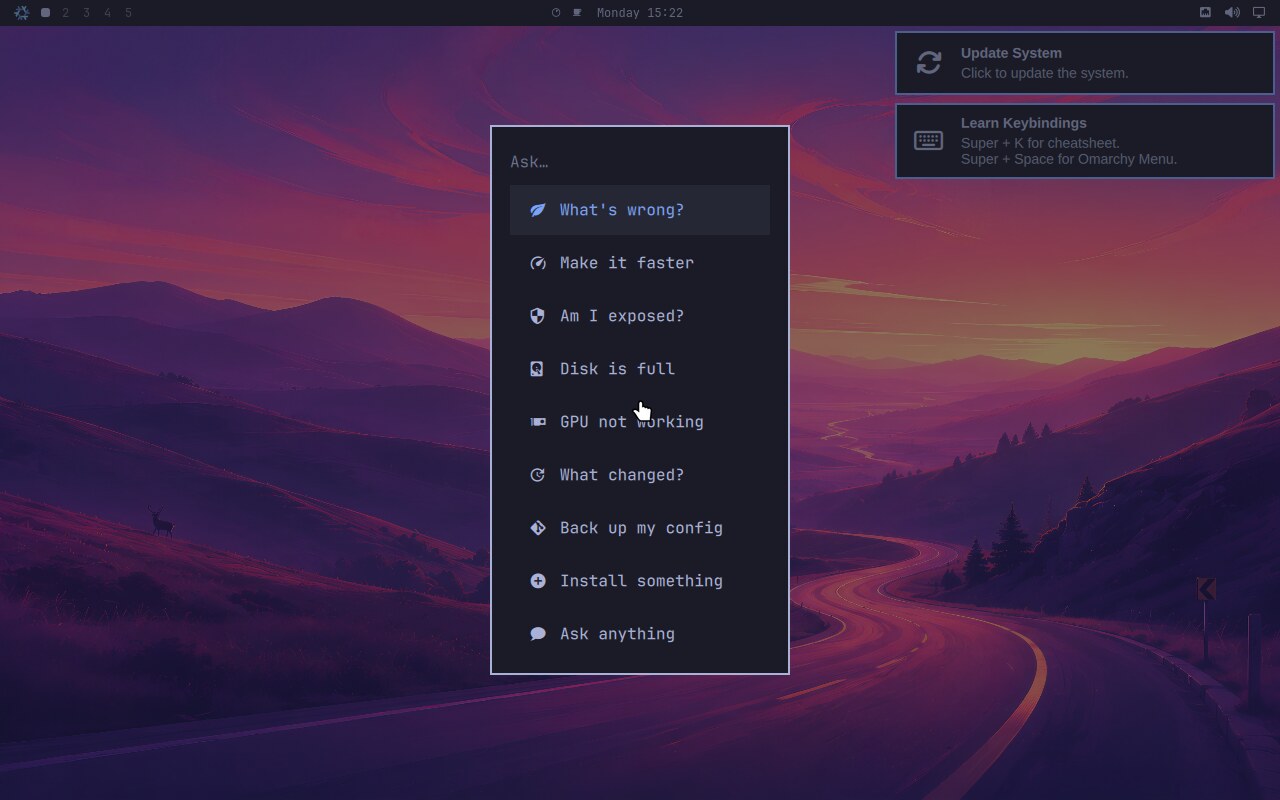
The prompts live in nixarchy-ask, not in the menu JSON, so they can be read
and corrected as text. Each names its skill, because a model follows a skill it
has been handed far more reliably than it chooses one from nine descriptions;
moving that decision out of the model and into a file makes it reviewable. Every
prompt also says measure first, propose before changing.
None of them names an agent. They go through omarchy-agent-prompt, so the same
row works with Claude, Codex, opencode, Pi or a local model, and keeps working
when you switch.
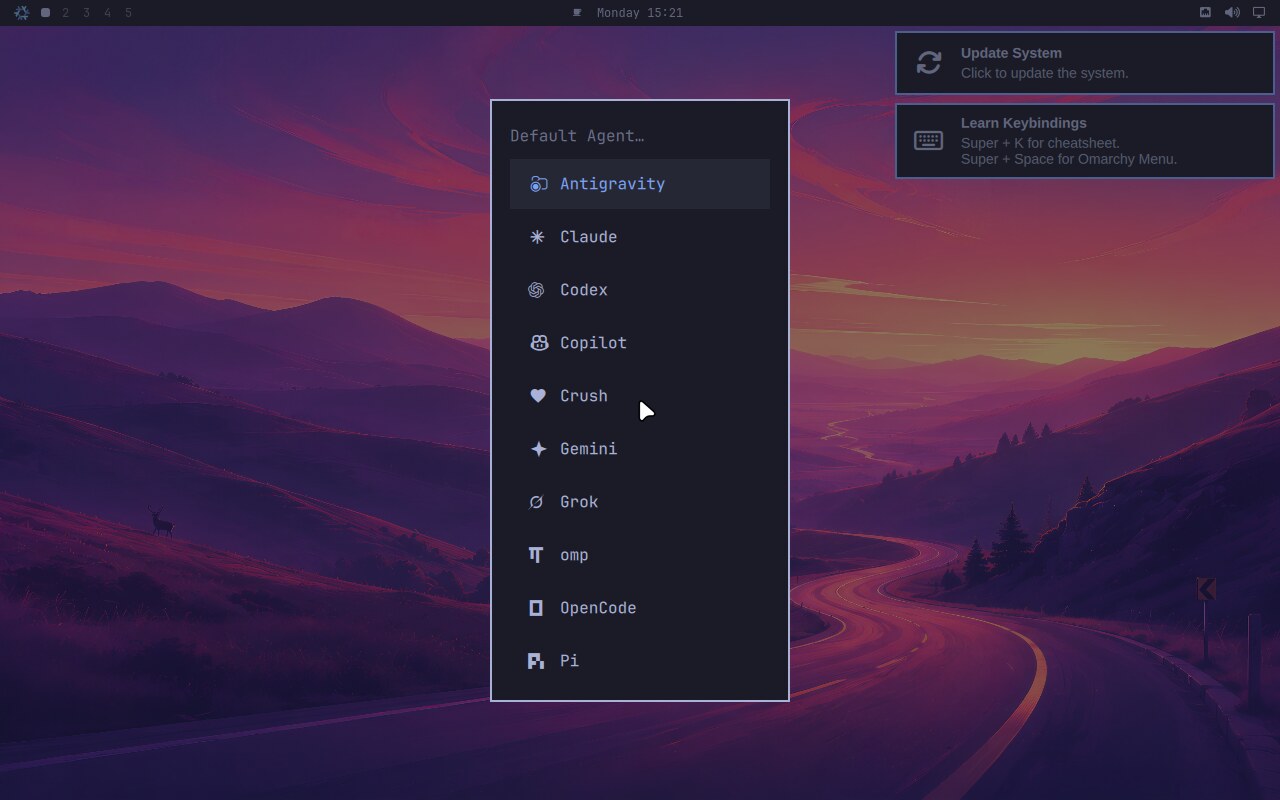
Choosing one installs it declaratively — nixarchy-pkg-add and a rebuild —
rather than fetching a binary into ~/.local that nothing records. Antigravity
is in the list because Google deprecated gemini-cli in its favour.
Nothing is ticked there because nothing is installed on that machine. Upstream’s tick asks whether an agent was picked, which on Arch is the same question; here a rebuild sits in between, so it asks whether the command exists.
In Neovim
The agents you select in the Install menu follow you into the editor nixarchy
ships. For each of Claude Code, Codex, Gemini CLI and OpenCode that is
selected, a spec is written once into ~/.config/nvim/lua/plugins/ importing
LazyVim’s own ai.sidekick extra — LazyVim maintains it, nothing here pins a
third-party plugin — and adding one key:
| key | opens |
|---|---|
<leader>ac |
Claude Code |
<leader>ax |
Codex |
<leader>ag |
Gemini CLI |
<leader>ao |
OpenCode |
<leader>aa / <leader>as / <leader>at … |
sidekick’s own: toggle, select, send this, and the rest |
<leader>a is cloud: large, and it costs money. <leader>o is the local
model, when localAi is on and pi is among its agents — small, private,
free, and reachable by muscle memory when the network is not:
| key | does |
|---|---|
<leader>oo |
toggle pi, which localAi already points at Ollama |
<leader>ot |
send this — the function or line under the cursor |
<leader>ov |
send the selection |
<leader>op |
pick a prompt |
An agent you did not select gets no spec, and every file is yours to delete. Sidekick’s next-edit suggestions are off, because they need the Copilot language server, which is not on the machine.
Want something that talks to Ollama directly, a completion plugin, a different
chat window? OLLAMA_ENDPOINT is in the session environment whenever
localAi is on — http://<host>:<port>/v1, derived from the port the server
actually bound — and programs.nixarchy.neovimSpecs writes the spec for you
under the same once-and-never-again rules. Point the plugin at
vim.env.OLLAMA_ENDPOINT and it follows the server.
Running the model locally
programs.nixarchy.localAi.enable = true;
Runs Ollama and writes provider configuration for opencode and Pi, so the skills
above work with no account and no network. Which Ollama gets built is derived
from the GPU the configuration already declares — hardware.nvidia means CUDA,
hardware.amdgpu means ROCm — so it follows the machine rather than needing to
be told twice.
Provider files are merged into ~/.config/opencode/opencode.json and
~/.pi/agent/models.json rather than owned, because Omarchy already writes to
the first one and home-manager refuses to clobber it.
Without a GPU it refuses to build. Measured on eight cores with qwen3:8b,
one question through an agent took five round trips and twenty-five minutes and
still did not finish. Nothing was misconfigured — an agent simply needs several
turns and each turn is minutes. Set allowCpu = true if you want it anyway.
The CUDA cache, on a machine with an NVIDIA card
cache.nixos.org carries no cudaSupport build — the NixOS Foundation does not
redistribute CUDA binaries — so a machine that turns CUDA on compiles PyTorch
from source, and magma-cuda-static alone is around a 10GB closure. nixarchy
adds the community cache for you, on a machine whose configuration declares an
NVIDIA card and nowhere else:
https://cache.nixos-cuda.org
programs.nixarchy.cudaCache = false declines it and builds locally instead. It
follows programs.nixarchy.binaryCaches, so somebody who turned all the caches
off does not have to find this one separately. Note that the URL moved off
Cachix in November 2025 — any guide naming cuda-maintainers.cachix.org is
pointing at a stale cache.
And the trap, which costs more than the cache saves. Narrowing
cudaCapabilities to your own card, usually with cudaForwardCompat = false,
is real advice that genuinely cuts closure size and compile time — and it takes
you off this cache, because what the cache holds is the default capability
set. It is a source-build optimisation, and on a machine that could have
substituted everything it makes the rebuild strictly slower. Leave the
capabilities alone unless you have already decided to build locally.
There is no ROCm equivalent: rocmSupport means local builds, full stop. The
vulkan Ollama build is how an AMD machine sidesteps that, and acceleration =
"vulkan" is how you ask for it.
Models on the big disk
Weights are multi-gigabyte mutable blobs, and the defaults put them on / —
/var/lib/ollama/models for Ollama, ~/.cache/huggingface for everything
else. A laptop with a small root and a big second disk fills the root quietly,
and a full / on NixOS is also a machine that cannot rebuild its way out.
programs.nixarchy.localAi = {
  enable = true;
  modelsDir = "/mnt/data/ollama/models";
  hfHome = "/mnt/data/huggingface";
};
modelsDir writes services.ollama.modelsDir on unstable and
services.ollama.models on nixos-26.05 — nixpkgs renamed it, and nixarchy uses
whichever name your nixpkgs declares, because on stable the new name does not
exist and on unstable the old one is an alias that warns. The unit’s OLLAMA_MODELS is derived from it, so the server and
anything reading its environment cannot disagree. Setting it also asks for a
static ollama user and creates the directory owned by it: the service runs
under DynamicUser by default, whose uid is allocated at start, so a directory
outside its state directory has no owner to be given to — and a path in
ReadWritePaths that does not exist fails the unit’s mount namespace outright.
hfHome is a session variable, for huggingface-cli, a transformers script,
anything you start from a shell. Open WebUI has its own HF_HOME under
services.open-webui.stateDir, which is the option to move for that one. If you
add systemd hardening or impermanence of your own, both paths need naming there
too — people hit this with InaccessiblePaths derived from /var/lib/*.
A chat window over it
programs.nixarchy.services.open-webui.enable = true;
Then http://localhost:8080. It is off by default like everything else in the
services catalogue, and it is a thin layer over services.open-webui: port,
host, stateDir and openFirewall stay upstream’s options, because those are
the names every wiki page uses. What nixarchy adds is the part that goes wrong
unattended — the UI is pointed at the Ollama this machine actually runs, rather
than at its own built-in guess of localhost:11434, which on a host that moved
the port produces a working UI with an empty model list and no error anywhere.
It refuses to build with no Ollama on the machine, and it keeps Open WebUI’s
telemetry-off settings, which are easy to lose: upstream keeps them in the
default of services.open-webui.environment, and an option default is
replaced wholesale the moment anything defines the option.
The first visitor becomes the administrator. Leave it on loopback and reach
it over Tailscale; if you do open the firewall, log in once first. nixarchy warns
at build time when openFirewall is on.
nixarchy local-ai pulls the model, reads the actual VRAM, recommends a size
and tells you the measured tokens per second, which is a better basis for
expectation than a table. It will not recommend anything below 4b: qwen3:1.7b
lists the skills and calls tools correctly, then answers from memory while
saying it used them — which is worse than no local model, because the mistake
arrives looking sourced.
Putting the configuration in git
nixarchy config repo
The installer leaves /etc/nixos as a repository with one staged tree and no
commit, because committing needs an identity that is not an installer’s to
choose. This finishes it: identity, a .gitignore that knows encrypted secrets
belong in the repo and plaintext ones do not, a scan for secrets before the
first commit, private-or-public as a decision, a remote through gh or glab,
and an eval-only CI workflow.
It is offered once as a notification after an agent is set up, and a configuration that is already committed and pushed marks itself done rather than asking again.
Giving an agent less than the whole machine
Two things this desktop has that are worth knowing before you hand an agent a terminal, because neither is advertised and both are free.
An agent’s damage to the system is one command to undo.
sudo nixos-rebuild --rollback switch
or the previous generation in the boot menu. Whatever it added, removed or reconfigured through the system’s configuration is gone, atomically. It does not touch your home directory, your working tree, or anything installed imperatively — but it is why “let it edit my configuration” is a much smaller bet here than on a distribution where the change is not reversible.
And it can be given a machine instead of yours. nixarchy vm create
review-bot --template agent boots a MicroVM whose only view of this machine
is the read-only /nix/store and one shared directory — and whose network
reaches nothing but the hosts you list, one per line, in the VM’s own
allow-hosts file. Your model endpoint and your git remote, and nothing
else; not even DNS for anything else.
Sandboxes ▸ Running an agent that cannot phone home is the page for it, including an honest list of what it does not contain.
Pointing your own AI at nixarchy
Ask any assistant about nixarchy cold and it answers from what it absorbed
about Omarchy on Arch — which is wrong in exactly the way that matters here:
apps are declarations, not pacman -S, and nothing installs until a rebuild.
So this repository publishes a file written for language models:
https://olafkfreund.github.io/nixarchy/llms.txt
Hand it over and the answers change:
| your assistant | what to do |
|---|---|
| Claude, ChatGPT, Gemini — anything with web access | Paste the URL: “Read this and answer my nixarchy questions from it.” |
| An assistant with no web access | Open the URL, copy the file, paste it in as reference |
| Claude Code, Cursor, or another agent in a checkout | Point it at docs/llms.txt — it is a normal file in the tree |
| The assistant on a running nixarchy machine | Nothing. It already reads the skills described above. |
It carries the install model, the two ways in and which one is mature, the commands, and the manual’s layout — deliberately including the caveat that the ISO installer is the least settled part, so an assistant does not recommend it to somebody who already runs NixOS.