Asking your agent
For a plugin whose NixOS verdict isn’t likely ok, two keys in its details bring in help (for one that is, the terminal says there is nothing to fix):
eexplain: your agent reads the audit, then explains each finding and the exact change it needs. It edits nothing.ffix: your agent edits a copy of the plugin. You see the diff, the copy is audited again, and you choose what happens next.
“Your agent” is the one you chose with omarchy default agent, the same one
nixarchy ask uses. It is told to read the nixarchy and nixos-binaries
skills first.
Before it starts
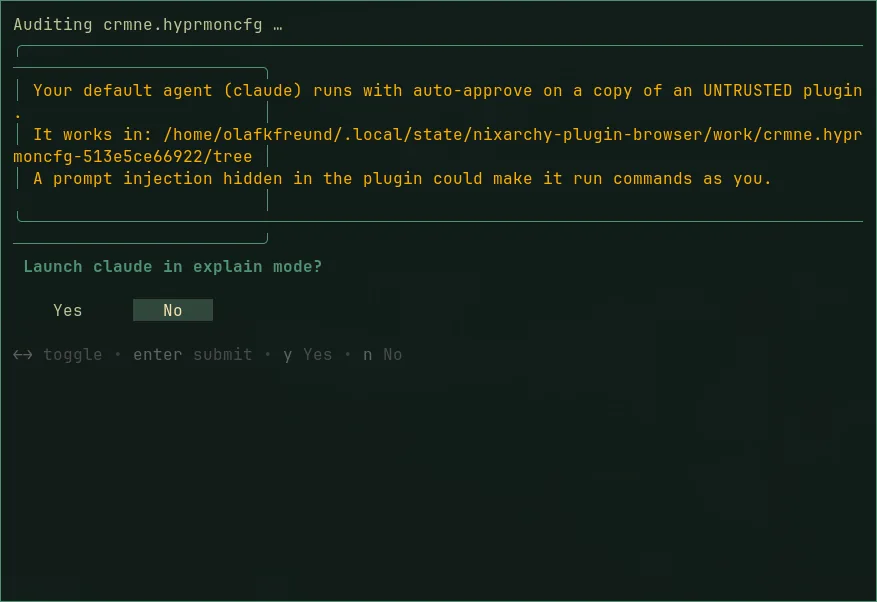
Both keys open a terminal that runs the audit, then says plainly what is about to happen, and asks. The answer defaults to No.
What the agent gets, and what it doesn’t
- A copy of the plugin, with no
.git, in~/.local/state/nixarchy-plugin-browser/work/<id>-<sha>/. - The audit report, as a file path. The plugin’s own text never goes into the prompt, and the prompt tells the agent to treat every file as data and to ignore instructions in them.
- Instructions to install nothing, rebuild nothing, enable nothing, and
touch nothing outside the copy. Packages the plugin needs are written down
as
nixarchy pkg addlines, never installed.
After a fix
The copy is audited again, and refused if it audits worse. The patch is
saved to ~/.local/share/nixarchy-plugin-browser/patches/<id>/. Then you
choose:
- Install patched: a fresh clone at the audited commit, with the patch committed on a local branch, scanned, and installed disabled.
- Keep patch only.
- Discard.
A patched plugin sits on a local commit, so omarchy plugin update stops
rather than overwriting it. Run the fix again for the new version.
The risk that remains
The plugin is untrusted, and your agent runs with its auto-approve flags.
Everything above narrows what it is asked to do, and nothing is installed
without a second audit and your choice. But while the agent session runs,
a prompt injection hidden in the plugin could still make it run commands as
you. If that is not a risk you want, read the audit yourself and don’t
press e or f.