Getting started
On nixarchy
From the nixarchy release that ships it (nixarchy#913), the Plugin Browser is one of nixarchy’s default plugins: installed, with its command-line tools and bubblewrap, and turned on at your first login. Open it from Setup ▸ Plugins ▸ Add Plugin. Upstream’s Git-URL prompt is still there as Add Plugin from URL.
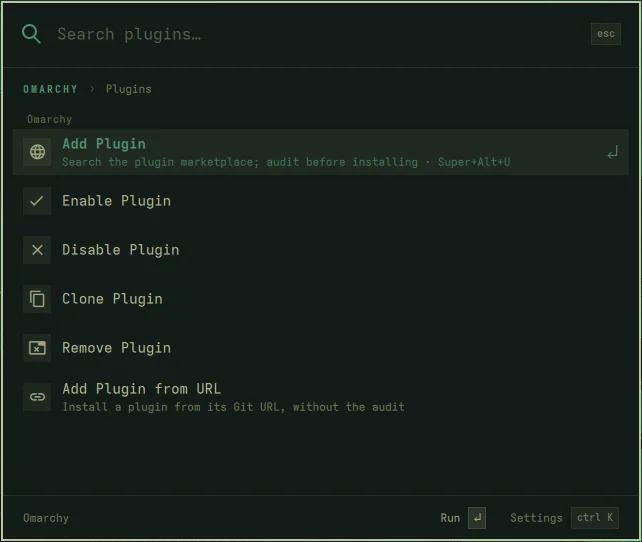
-
Super+Alt+U is seeded into
~/.config/hypr/bindings.luaon new installs. nixarchy never edits that file afterwards, so on an existing machine use the menu row, or add the line yourself:o.bind("SUPER + ALT + U", "Plugin browser", "nixarchy-plugin io.github.olafkfreund.nixarchy-plugin-browser")The binds file this plugin ships uses
omarchy-shell shell toggle <id> '{}'(hypr/plugin-browser-binds.lua:14). Both open the same panel. - After the update that brings it in, log out and back in once. The menu is read from the Omarchy tree your session started with, so until you do, Add Plugin still opens the old prompt.
-
To not have it at all:
programs.nixarchy.defaultPlugins.plugin-browser = false; - If you installed it by hand before, remove your copy before
switching:
rm -rf ~/.config/omarchy/plugins/io.github.olafkfreund.nixarchy-plugin-browser. Home Manager won’t replace a real directory with its link. The plugin stays enabled, and the managed copy takes over.
On NixOS without nixarchy’s default
The repository is a flake. With nixarchy’s plugin option:
# flake.nix inputs
nixarchy-plugin-browser.url = "github:olafkfreund/nixarchy-plugin-browser";
nixarchy-plugin-browser.inputs.nixpkgs.follows = "nixpkgs";

# a Home Manager module
{ inputs, pkgs, ... }:
let pb = inputs.nixarchy-plugin-browser; sys = pkgs.stdenv.hostPlatform.system; in
{
  imports = [ pb.homeManagerModules.default ];        # optional: the Super+Alt+U binds file
  programs.nixarchy.plugins.plugin-browser.src = pb.packages.${sys}.default;
  home.packages = [ pb.packages.${sys}.cli pkgs.bubblewrap ];
}
Then enable it once, and load the binds file from your bindings.lua:
omarchy plugin enable io.github.olafkfreund.nixarchy-plugin-browser
pcall(require, "hypr.plugin-browser-binds")
| Output | What it is |
|---|---|
packages.<system>.default (.plugin) |
the plugin folder, runtime files only |
packages.<system>.cli |
omarchy-plugin-audit, omarchy-plugin-browser, nixarchy-plugin-fix |
homeManagerModules.default (also homeModules.default) |
programs.nixarchy-plugin-browser.keybinding, which writes the binds file |
Without Nix
From a clone:
./install.sh --plugin     # the three tools in ~/.local/bin, and the plugin (disabled)
omarchy plugin enable io.github.olafkfreund.nixarchy-plugin-browser
The audit refuses to run without bwrap. On nixarchy:
nixarchy pkg add bubblewrap && nixarchy apply. ./uninstall.sh reverses
everything.
Next: the panel.