Using nixarchy.distrobox
A walkthrough, from installing the plugin to fixing the usual problems. The reference tables (every key, every setting, IPC) are in the README.
What it is
Distrobox runs other Linux distributions in containers that share your home directory, so you can use an Ubuntu or Arch toolchain on NixOS. This plugin puts those boxes on the Omarchy bar and behind a key. It lists them, and lets you create, enter, start, stop, upgrade and delete them without a terminal. The one exception is entering a box, which opens a terminal by design.
Requirements
distroboxon yourPATH.- A container engine:
podman(the default) ordocker. The plugin reads the list from this engine, and runs every distrobox command withDBX_CONTAINER_MANAGERset to it. omarchy-launch-tuiopens the terminal for Enter.wl-copycopies names and snippets. Omarchy ships both.setsid(util-linux) andkill(coreutils), so that cancelling withKstops the engine the command started, and not just the command.
A command that is missing fails silently inside the shell, so check these first when nothing happens.
Install on NixOS (nixarchy)
Add the flake as an input and hand its package to nixarchy:
inputs.nixarchy-distrobox = {
  url = "github:olafkfreund/nixarchy-distrobox";
  inputs.nixpkgs.follows = "nixpkgs";
};

programs.nixarchy.plugins."nixarchy.distrobox".src =
  inputs.nixarchy-distrobox.packages.${pkgs.stdenv.hostPlatform.system}.default;
Rebuild, then enable it once: omarchy plugin enable nixarchy.distrobox. The
glyph lands on the right side of the bar.
nixarchy will not replace a real directory at
~/.config/omarchy/plugins/nixarchy.distrobox. If you installed it by hand
before, remove that directory first.
Install without Nix
omarchy plugin add https://github.com/olafkfreund/nixarchy-distrobox
omarchy plugin enable nixarchy.distrobox
The bar popup
Click the glyph, or run omarchy shell nixarchy.distrobox.bar open.
The glyph is:
- accent-coloured while a box runs;
- dim when none do;
- red when a box has failed.
Middle-click refreshes.
The popup lists your boxes, running ones first. Each row shows:
- a state dot: filled when running, hollow when stopped, red when failed;
- the name;
- the image and home directory (
~means the box shares your home); - the status for a box that is not running.
Buttons on the right of each row do the same as the keys: enter, start or stop, restart, upgrade and delete.
The full-screen menu
The menu has the same list, form and log, drawn larger. It opens over whatever you were working in and holds the keyboard until you close it:
omarchy-shell shell toggle nixarchy.distrobox '{}'
omarchy-shell shell toggle nixarchy.distrobox '{"create":true}'   # straight into the form
Add it to the Omarchy menu
Paste the row in share/omarchy-menu.jsonc into
~/.config/omarchy/extensions/omarchy-menu.jsonc. After that, searching for
distrobox, boxes or toolbox in the Omarchy menu (Super+Alt+Space) finds it.
Give it a key
In ~/.config/hypr/bindings.lua:
o.bind("SUPER + ALT + D", "Distrobox", "omarchy-shell shell toggle nixarchy.distrobox '{}'")
Bar and menu are one thing
Both surfaces show the same state. A create started in the menu shows up in the popup’s log, and while it runs, a start or delete from the popup is refused. Closing a surface never stops a job.
Everyday tasks
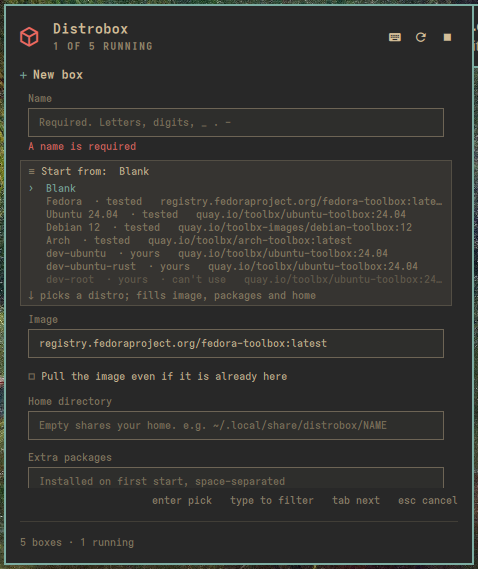
Create a box
- Press
c. The form opens with the cursor on Name. - Type a name, then Tab to Start from to begin from a template, or skip
it. Press ↓ for the list, type to filter it, and Enter to pick. A
template fills the image, a home under
~/.local/share/distrobox/<name>, and, with Init on, the packages systemd needs on that distro. Every field stays editable, and Blank puts the defaults back. The built-in Fedora, Ubuntu 24.04, Debian 12 and Arch templates are marked tested: each was created with Init on and started on nixarchy with systemd as PID 1. - Tab to Image. The default is the Fedora toolbox. Press
↓ to move into the list of curated images and Enter to pick one, or type
any full reference (
registry/path:tag). - Tab through the rest:
- Home directory: leave it empty to share your home, or give a path such
as
~/.local/share/distrobox/mybox. - Extra packages: installed on first start.
- Init: runs systemd inside the box.
- NVIDIA: shares your driver.
- Home directory: leave it empty to share your home, or give a path such
as
- Advanced (press Space on it) holds:
- hostname;
- clone (Space cycles through your stopped boxes);
- volumes (
host:box[:ro], space-separated); - engine flags (
--flagor--flag=value); - init and pre-init hooks;
- platform;
- the
--unshare-*switches and--no-entry.
- Press Enter. If something is wrong, the field says what, and nothing runs. Otherwise the log opens and shows the image pull and the create as they happen.
A new box is created but not yet set up. Its first start (s, or Enter to
enter it) runs distrobox’s setup, which installs its packages and can take a
few minutes.
Your own templates
Your own boxes can be templates too. Put them in a distrobox assemble file at
~/.config/distrobox/boxes.ini (the Your templates setting changes the
path). Each [section] then appears under Start from, marked yours:
[dev-ubuntu]
image=quay.io/toolbx/ubuntu-toolbox:24.04
home=~/.local/share/distrobox/dev-ubuntu
additional_packages="git tmux"
init=true

[dev-ubuntu-rust]
include=dev-ubuntu
additional_packages="rustup"
- The section name becomes the box name.
includepulls in another section, and keys that can repeat (volume,additional_packages,additional_flags, the hooks) add to what they include. - Picking one fills the form. Nothing is created until you press Enter, and every value is checked exactly as if you had typed it.
- The plugin reads the file itself and never runs
distrobox assemble, because assemble runs the file’s values as shell. The same file still works withdistrobox assemble create --file …in a terminal. - Refused, with the reason shown:
exported_apps,exported_bins,root=true,replace=true, unknown keys, a single-value key set twice, and any value the form would refuse.start_nowandname=are ignored, with a note. - Edits to the file show up the next time you open the list. No restart is needed.
Enter, start, stop
- Enter (or
e) opens a terminal inside the box and closes the panel. sstarts a stopped box and waits for its setup to finish (the row says “starting…”), or stops a running one.rrestarts a running box.Sstops every running box, after asking.
Upgrade
g upgrades the box under the cursor and U upgrades every box. The log opens
and follows the package manager’s output:
- press Esc to go back to the list; the upgrade keeps running, and the footer says so;
- press
oat any time to see the log again; jandkscroll it, andGjumps back to the end.
U upgrades the boxes one at a time, in list order, and starts any that are
stopped. A box that fails does not stop the rest: the last line of the log
says how many were upgraded and names the ones that failed.
Keep a box you made by hand
p copies a Nix snippet for the box under the cursor and shows it:
programs.nixarchy.services.boxes.machines.work = {
  image = "quay.io/toolbx-images/debian-toolbox:12";
  # Add whatever else this box needs -- additional_packages, init_hooks,
  # exported_apps -- see distrobox-assemble's manual. …
};
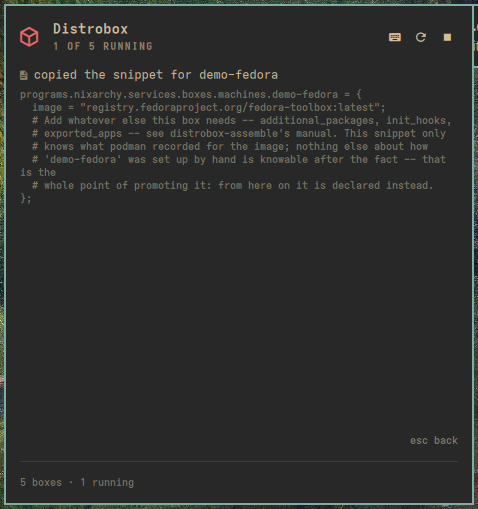
Paste it into your nixarchy flake and the box is declared: a rebuild makes it
again on any machine. A name that is not a plain Nix identifier, such as
my.box, is quoted (machines."my.box").
The plugin edits nothing — not your flake, not the box. Until you paste it and rebuild, the box carries on exactly as before, and the image in the snippet is the one the engine reports today, so check it if you have retagged since.
Esc goes back to the list. p works while a create or upgrade is running, and
leaves that log alone.
Delete
x asks first, and Cancel is the default answer. Delete removes the
container but keeps its home directory; the question says which directory that
is.
Settings
The bar widget’s settings are refreshIntervalSec, showStopped,
containerManager, hideWhenEmpty and templatesFile. What each one does is in the
README. The menu reads the same settings.
On docker, set Container engine to docker. The list then comes from
docker, and every distrobox command is told to use docker too, so nothing ever
acts on a podman box with the same name.
Troubleshooting
“podman unreachable” (or docker). The engine did not answer. Run
podman info or docker info to see why, or switch Container engine to
the one your boxes live in.
An image name is refused, or a pull fails with “short-name did not resolve”.
Podman on nixarchy has no unqualified-search registries, so alpine on its own
means nothing. Use a full reference such as
quay.io/toolbx-images/alpine-toolbox:latest, or pick one from the image list.
A pull fails with “no space left on device”. Podman stages image layers in
/var/tmp. On a machine where that is a small tmpfs, a large image can fill it.
Check with df -h /var/tmp.
A field says it cannot contain a character. Every create field is checked before anything runs, because distrobox runs the create command through the host shell. The limits are:
- paths (home, volumes) cannot contain spaces or quotes;
- pre-init hooks cannot contain
" \ $or backticks, so no$VARthere; - init hooks cannot contain
'; - engine flags must be
--flagor--flag=value, with no spaces inside a value.
A box made with Init fails its first start: “no init found”. --init
needs an image that ships an init system, and the toolbox images do not.
Recreate it from a Start from template with Init on, which adds the right
packages for that distro, or choose an image that includes systemd.
One of your templates is listed but greyed out (“can’t use”). Pick it to see why. The reason names the key or value the plugin refuses (see Your own templates). Fix that section in the file; the list updates when the file is saved. A file larger than 64 KB lists nothing, and a section longer than 256 lines once its includes are added is greyed out.
“Busy: … — press o to watch, K to cancel”. Only one change runs at a time,
across the popup and the menu. Wait for it to finish, press o to watch it, or
press K to cancel it and get the panel back.
Nothing works and every key says “Busy”. A command that never finishes —
a container engine that has stopped responding, or a first image pull that has
stalled — used to hold the panel until you restarted the shell. Press K, in
the list or in the log. It stops whatever is running — including the engine
that command started, so a half-finished download stops too — and frees the
panel.
K stops the work; it does not tidy up after it. A cancelled create can
leave a half-made box behind, and a cancelled U leaves the boxes it had not
reached alone. Both show up in the list as they really are, and a half-made
box is an ordinary box you delete with x.
A running create or upgrade stopped. Restarting or reloading the shell ends
it, along with the distrobox process it was running. Start it again. A box
that was half-created is an ordinary box: delete it with x.
--root boxes are not listed. Rootful boxes need sudo, which the panel
cannot provide without a terminal. Manage them from a terminal with
distrobox --root.
Removal
omarchy plugin disable nixarchy.distrobox
Then remove the programs.nixarchy.plugins."nixarchy.distrobox" line and
rebuild. Without Nix, delete ~/.config/omarchy/plugins/nixarchy.distrobox
instead. Your boxes are not touched.