NixOS MicroVMs for the Omarchy shell on nixarchy. Both kinds of VM nixarchy has, in one list on the bar and behind a key, and a new one is a form away.
Who it is for
You run nixarchy, and sometimes you want a machine that is not your machine: a
clean NixOS to try something in, a Python box with its own packages, a sandbox
for an agent that must not reach your files, or a small server that comes up
with the host and listens on a port. nixarchy already boots those in seconds,
sharing your /nix/store. This is for when you would rather glance at your bar
and press a key than remember two vocabularies.
The problem
nixarchy has two kinds of MicroVM, and both live in a terminal:
nixarchy vm create dev --template python   # a disposable VM
nixarchy vm run dev                        # builds, then holds this terminal
nixarchy vm list                           # a table, and nothing else can read it

programs.nixarchy.services.microvm.machines.build = {   # a permanent VM,
  template = "shell"; memory = 4096; cores = 2;         # in your own flake,
  sshPort = 2222; shares = [ { source = "/home/me/src"; mountPoint = "/mnt/src"; } ];
};                                                      # then a rebuild
- Nothing shows state. Nothing on your desktop says whether a VM is running, or whether a permanent one failed to come up.
runholds a terminal. The first run builds the VM, then attaches its console, in the foreground.- A permanent VM is an attrset you write by hand. Template, memory, cores,
port, shares, an SSH key inside a
moduleslist. A mistake shows up at the rebuild. - Two kinds, two mental models. Nothing puts them side by side or says which one you want.
What it does
One glyph in the bar says how your VMs are. It is dim when nothing runs, in the accent colour when something does, and red when a permanent VM’s unit has failed.
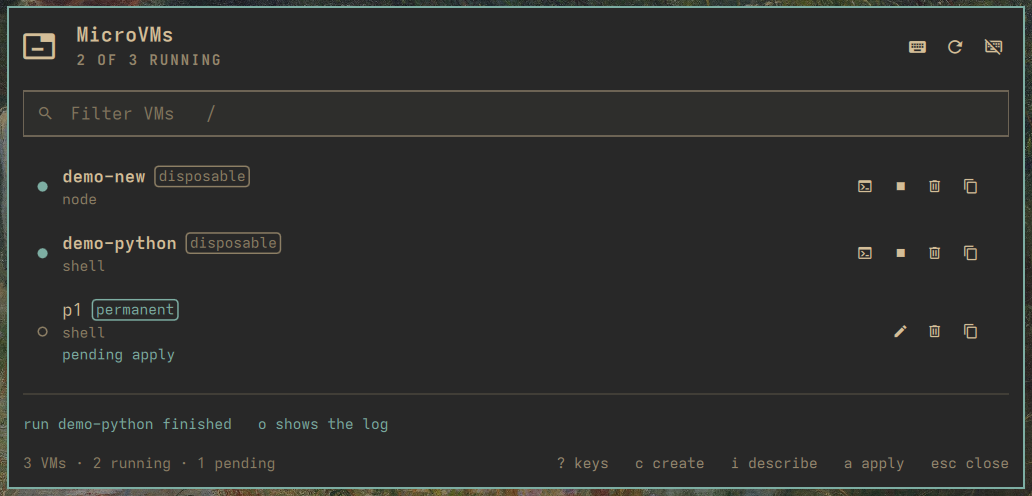
One list shows every VM, running first, each with a badge for its kind, its template and its state: stopped, not built yet, pending apply, or failed.
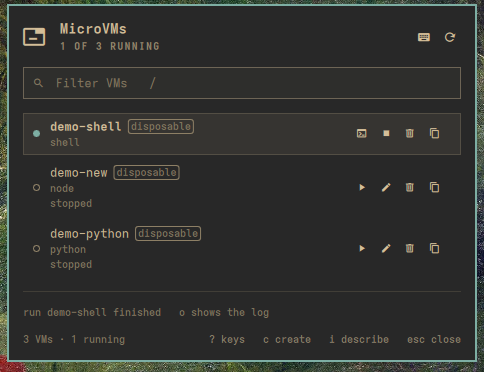
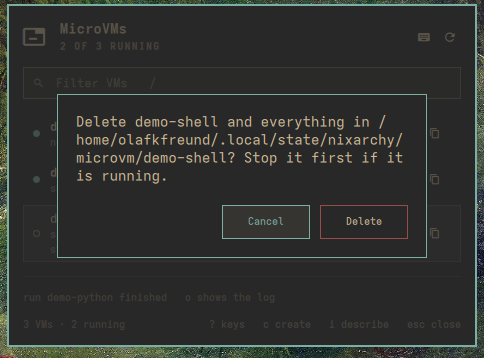
One change at a time. While a VM starts, stops, or is created or deleted, every other change is refused, from the popup and the menu alike. Deleting asks first, and enter alone answers Cancel.
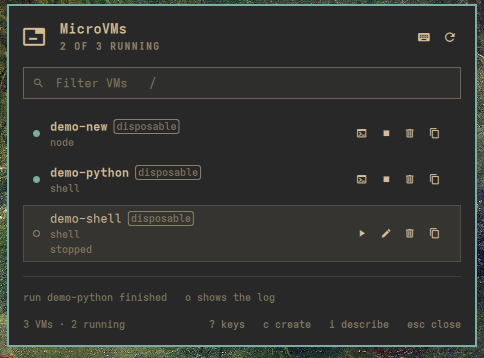
The console is a key away. enter on a running VM opens its console in a terminal. Ctrl+] leaves it, and the VM keeps running.

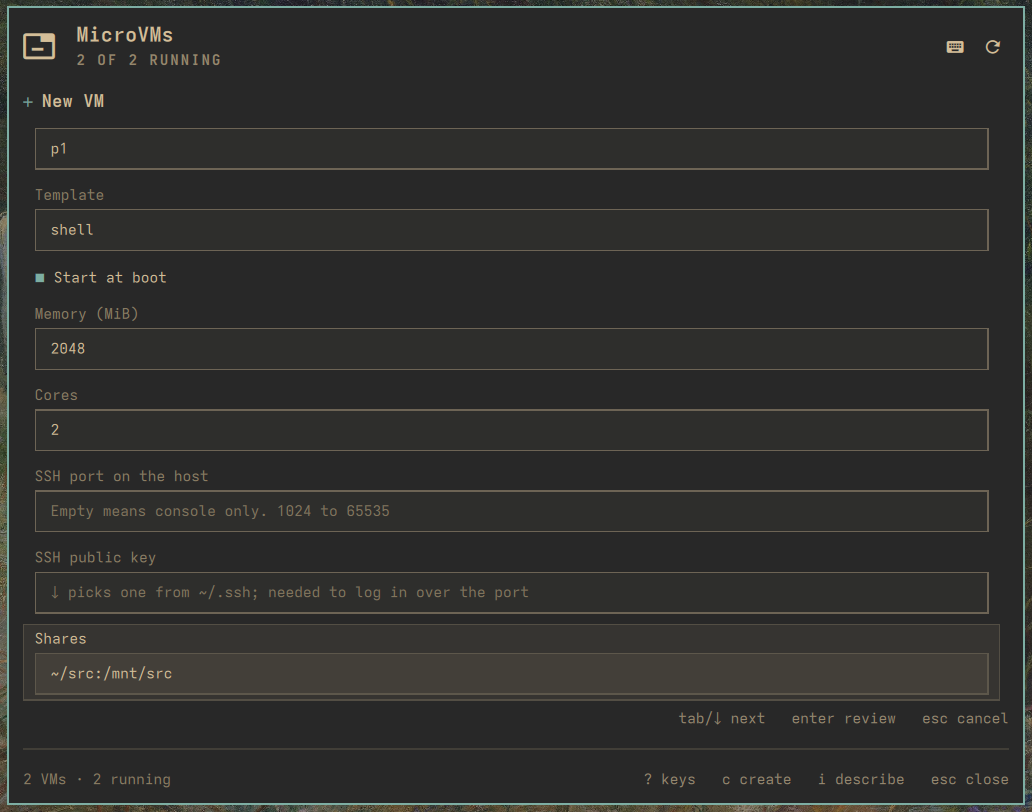
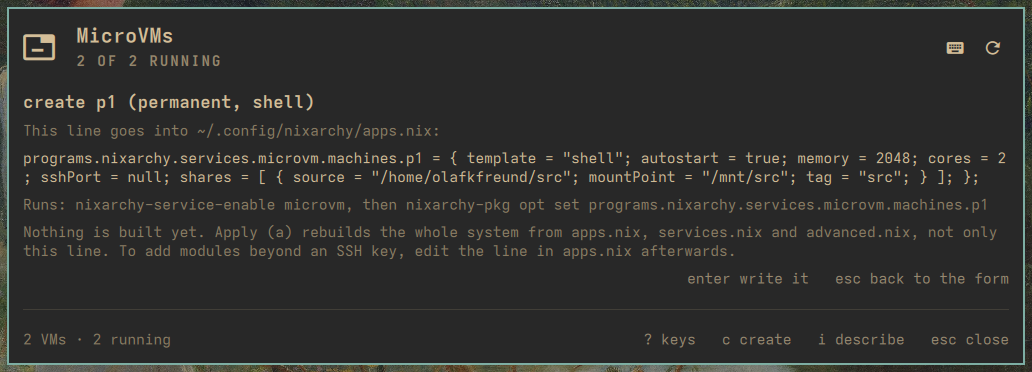
/nix/store.A form for either kind. Flip the kind with space. A disposable
VM is a name and a template. A permanent one adds autostart, memory, cores, an
SSH port, an SSH key picked from ~/.ssh, and shares. A mistake is flagged
under the field before anything is written.
Describe it instead. With claude as your default agent, the form starts
with a sentence. The agent proposes the kind, the name, the template and the
numbers; the form validates them as if you had typed them, and you confirm.
There are two ways in. Click the glyph for the popup, or press Super+Alt+V (or pick MicroVMs in the Omarchy menu) for a larger full-screen view that holds the keyboard until you are done.
How it works
- Two readers, one list. Disposable VMs come from
nixarchy vm list; permanent ones fromsystemctland from the lines in~/.config/nixarchy/apps.nix. A line the plugin wrote is managed; a line you edited by hand, or a machine declared elsewhere in your flake, is shown but never rewritten. - A permanent VM is one line, written by nixarchy’s own writers. The
plugin never touches a unit file,
/var/lib/microvmsor your flake. It hands one line to nixarchy.pkg’sopt set, which parse-checks the file and reverts on failure. Applying is your ownnixarchy-apply, opened in a terminal so you see every prompt and everything it rebuilds. - It detects what your nixarchy can do. Keys that need a newer
nixarchy vm(a build log in the panel, attaching to a running VM, changing a template) or a newer nixarchy-pkg (editing a permanent VM’s line) appear only when those features exist, as they do on a current nixarchy. On an older install, starting a disposable VM opensnixarchy vm runin a terminal, and the footer says so. - One change at a time. The bar and the menu share one state. While a start, stop, delete, create or edit runs, anything else that would change a VM is refused, and the refusal says why.
Why it is built this way
- Allowlists before Nix. Every value that reaches the apps.nix line comes
from a validator: a template from the catalogue, bounded integers, paths
from a character set with no
",\or${, an SSH key kept to its type and blob, share tags that never collide with the guest’s own. The grammar is fixed, and the plugin reads back only what it writes. - The agent proposes, the form decides. AI assist is one non-interactive
claudecall with every tool switched off and a strict JSON schema. Its reply is converted per field, validated as if typed, and shown with its reasoning. Nothing in it is executed; a prompt asking it to read a file or run a command yields at most a filled form. - Nothing irreversible happens by accident. x asks first, with Cancel selected, and says what it will and will not remove: a permanent VM’s state directory is never deleted by this plugin.
- Keyboard first. Omarchy is a keyboard desktop. Every action has a key, and a key that does not apply to a row is absent rather than broken. Press ? for all of them.
- No daemon, no wrapper. It runs
nixarchy-vmandsystemctlfrom yourPATH, as you. A closed surface does nothing, and the only background work is a slow check that keeps the glyph honest.
A tour
- Press Super+Alt+V. The list opens with your VMs, running first.
- c, a name, a template, enter: a disposable VM. s starts it with its build in the panel, enter opens its console, and s again stops it.
- c, space on Kind, the fields, enter: the
review shows the line. enter again writes it, and the row says
pending apply until a opens
nixarchy-apply. - i, a sentence, enter: the agent fills the form.
- ? lists every key. esc closes.
Set it up
On NixOS with nixarchy, add the flake, install the plugin, and let its Home Manager module write the key bind:
inputs.nixarchy-microvm = {
  url = "github:olafkfreund/nixarchy-microvm";
  inputs.nixpkgs.follows = "nixpkgs";
};

# NixOS
programs.nixarchy.plugins."nixarchy.microvm".src =
  inputs.nixarchy-microvm.packages.${pkgs.stdenv.hostPlatform.system}.default;

# Home Manager
imports = [ inputs.nixarchy-microvm.homeManagerModules.default ];
programs.nixarchy-microvm.keybinding = "SUPER + ALT + V";   # the default; null writes no bind
Then one line in ~/.config/hypr/bindings.lua, so the bind loads:
pcall(require, "hypr.microvm-binds")
Rebuild, then enable it once:
omarchy plugin enable nixarchy.microvm
Without Nix: omarchy plugin add https://github.com/olafkfreund/nixarchy-microvm,
the same enable, and copy microvm-binds.lua from the plugin folder into
~/.config/hypr/ before adding the pcall line.
Permanent VMs need the nixarchy.pkg
plugin, whose writers put the line into apps.nix. AI assist needs
omarchy default agent claude.
Read the manual for the Omarchy menu row, settings, troubleshooting and removal. The source is at github.com/olafkfreund/nixarchy-microvm.
Every image on this page is the real plugin on a real machine, driven from the
keyboard. It was captured with throwaway demo-* disposable VMs, which were
removed afterwards; the permanent VM in the list is the machine that host
declares. The machine’s own configuration was not changed.